
The Translation Layer: Kubernetes on Hetzner Cloud
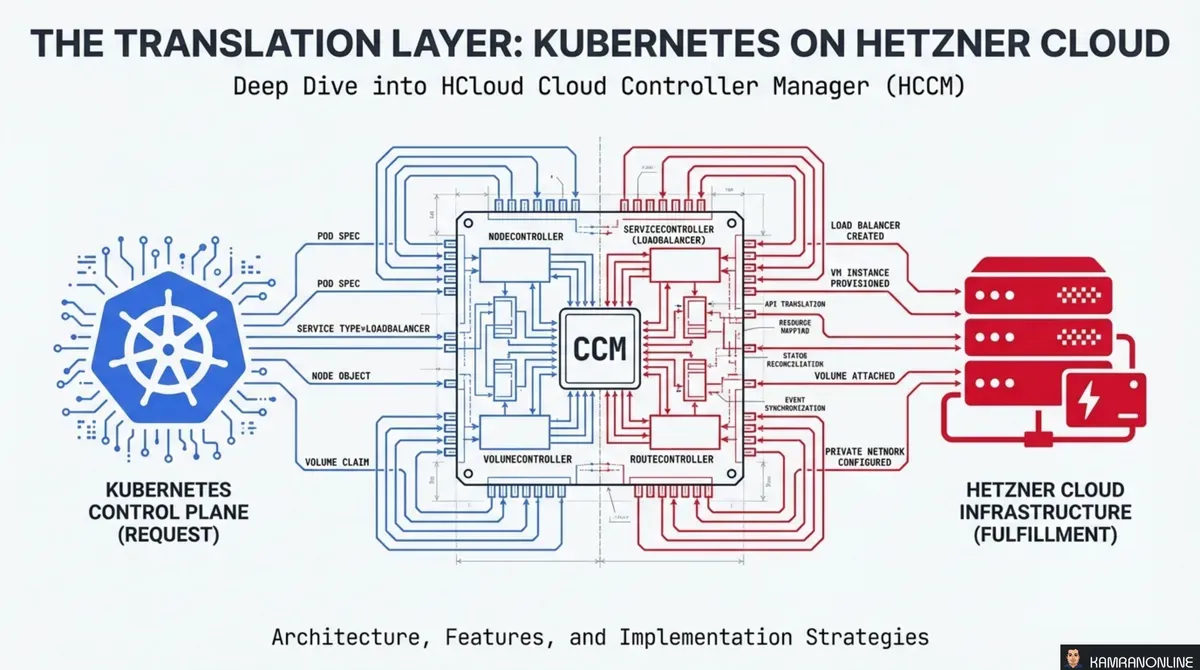
Kubernetes doesn’t know what a Hetzner server is. It doesn’t know how to provision a Hetzner Load Balancer, assign a private IP, or detect that a cloud VM was deleted. It speaks in abstract resources — Nodes, Services, Routes — and expects someone else to translate those abstractions into real infrastructure.
That translator is the Cloud Controller Manager (CCM). For Hetzner Cloud, it’s the HCloud CCM (HCCM) — an open-source component that sits between the Kubernetes control plane and the Hetzner Cloud API, turning declarative intent into provisioned infrastructure.
This post walks through the architecture, each controller’s role, and the practical considerations for deploying and migrating HCCM.
Out-of-Tree Evolution
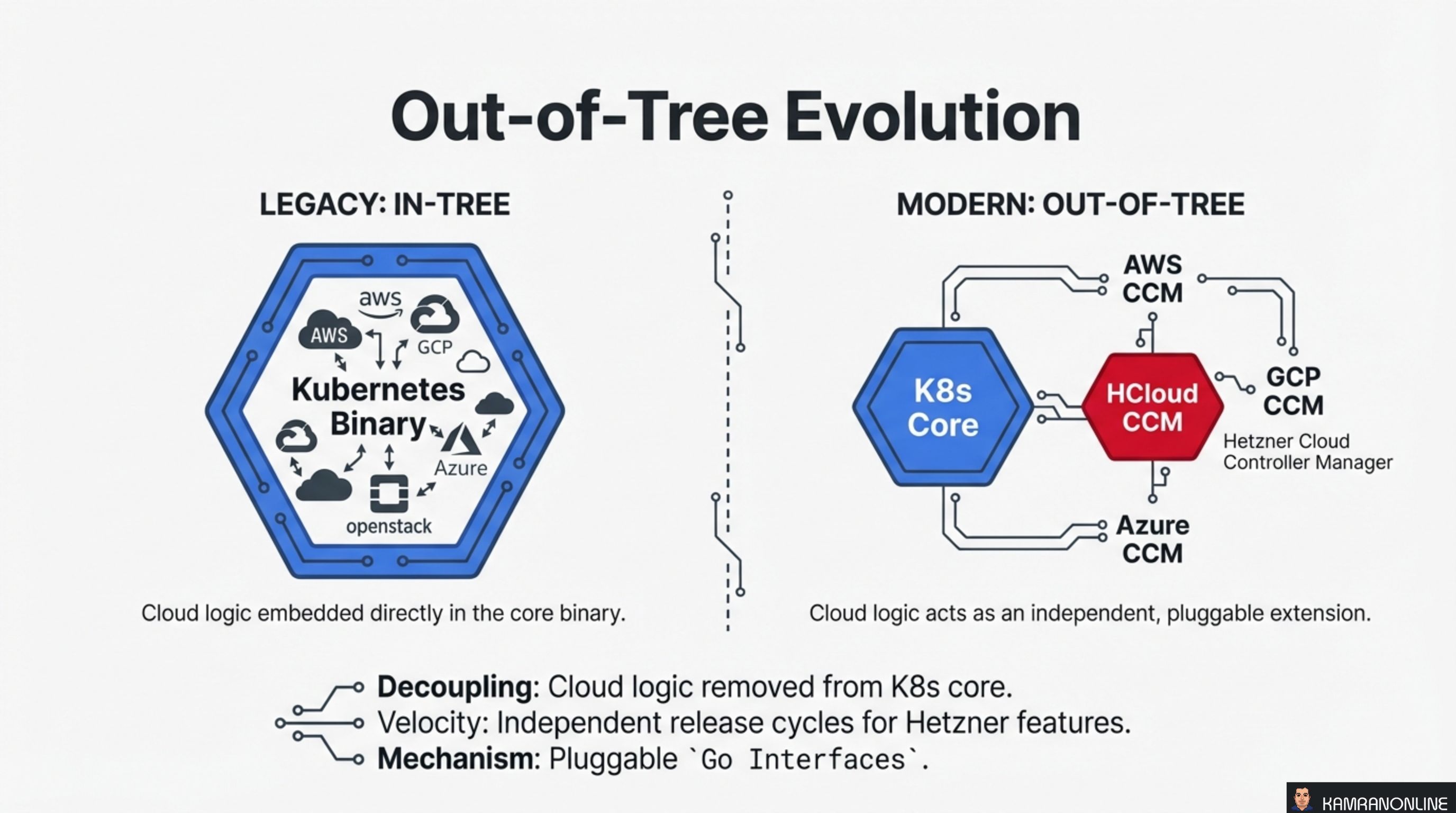
Originally, cloud provider logic was embedded directly inside the Kubernetes binary. AWS, GCP, Azure, OpenStack — all had their code compiled into the core. This was the in-tree model, and it created a coupling problem: every cloud provider change required a Kubernetes core release.
The modern out-of-tree model decouples cloud logic into independent, pluggable extensions. Each provider ships its own CCM binary that implements a standard set of Go interfaces. Kubernetes core stays cloud-agnostic.
For Hetzner, this means:
- Decoupling — cloud logic is completely removed from the Kubernetes core binary
- Velocity — Hetzner features ship on their own release cycle, independent of Kubernetes releases
- Mechanism — pluggable Go interfaces define the contract between Kubernetes and the provider
The HCloud CCM is one of these out-of-tree implementations, sitting alongside AWS CCM, GCP CCM, and Azure CCM as peers.
CCM Binary Anatomy: Modular Controllers
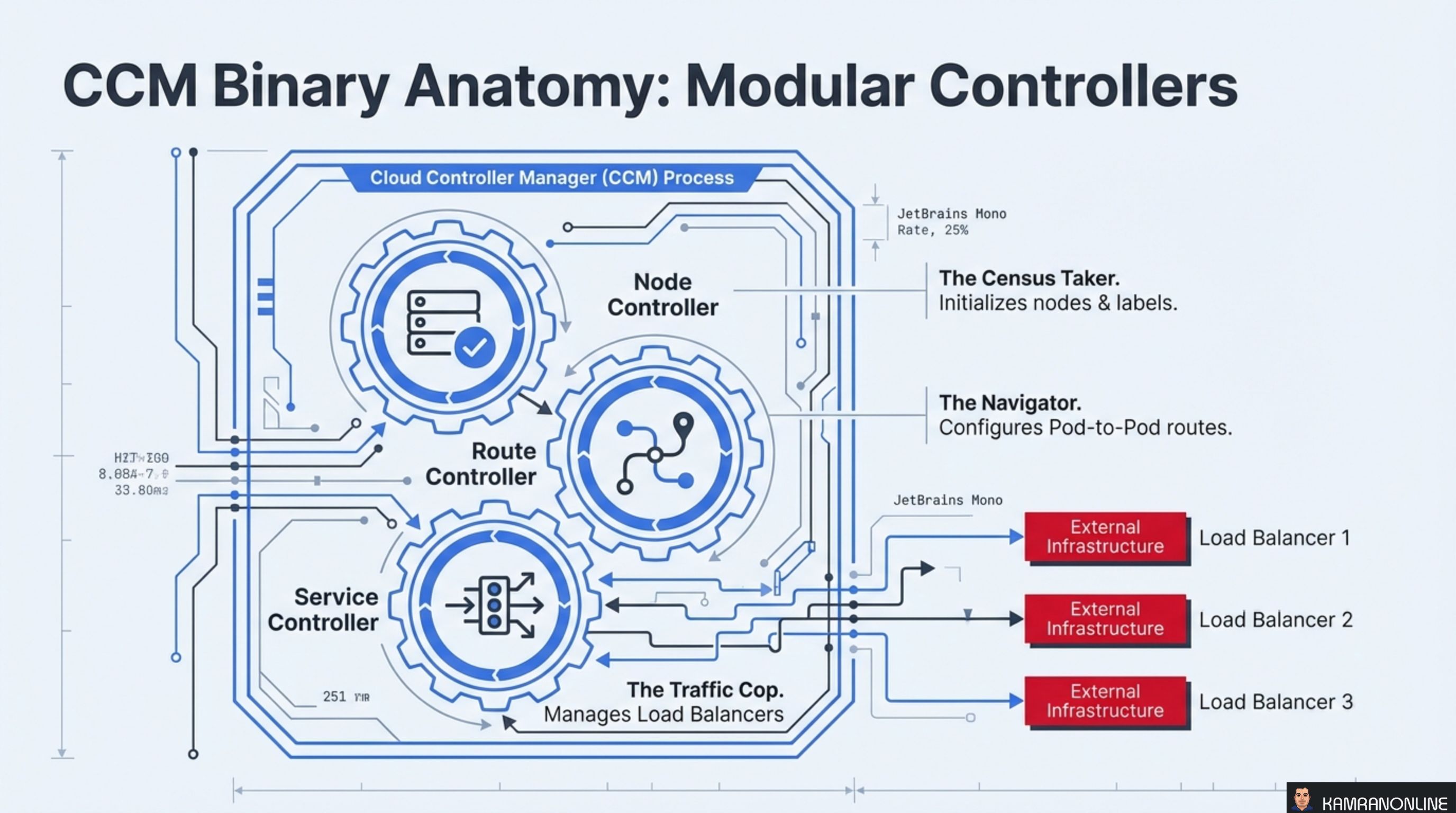
The CCM process is not a monolith — it’s a collection of three independent controllers running inside a single binary, each responsible for a different domain:
Node Controller — The Census Taker
Initialises nodes when they join the cluster and maintains their metadata. It labels nodes with instance type, region, and topology information, and removes stale node objects when the backing server no longer exists.
Route Controller — The Navigator
Configures pod-to-pod network routes across nodes. On Hetzner, this means managing routes within HCloud Private Networks so pods on different nodes can communicate directly.
Service Controller — The Traffic Cop
Manages external load balancers. When you create a Kubernetes Service of type LoadBalancer, the Service Controller provisions a real Hetzner Cloud Load Balancer and wires it to your pods.
Each controller operates independently — a failure in route management doesn’t block load balancer provisioning.
HCloud CCM: The Hetzner Implementation
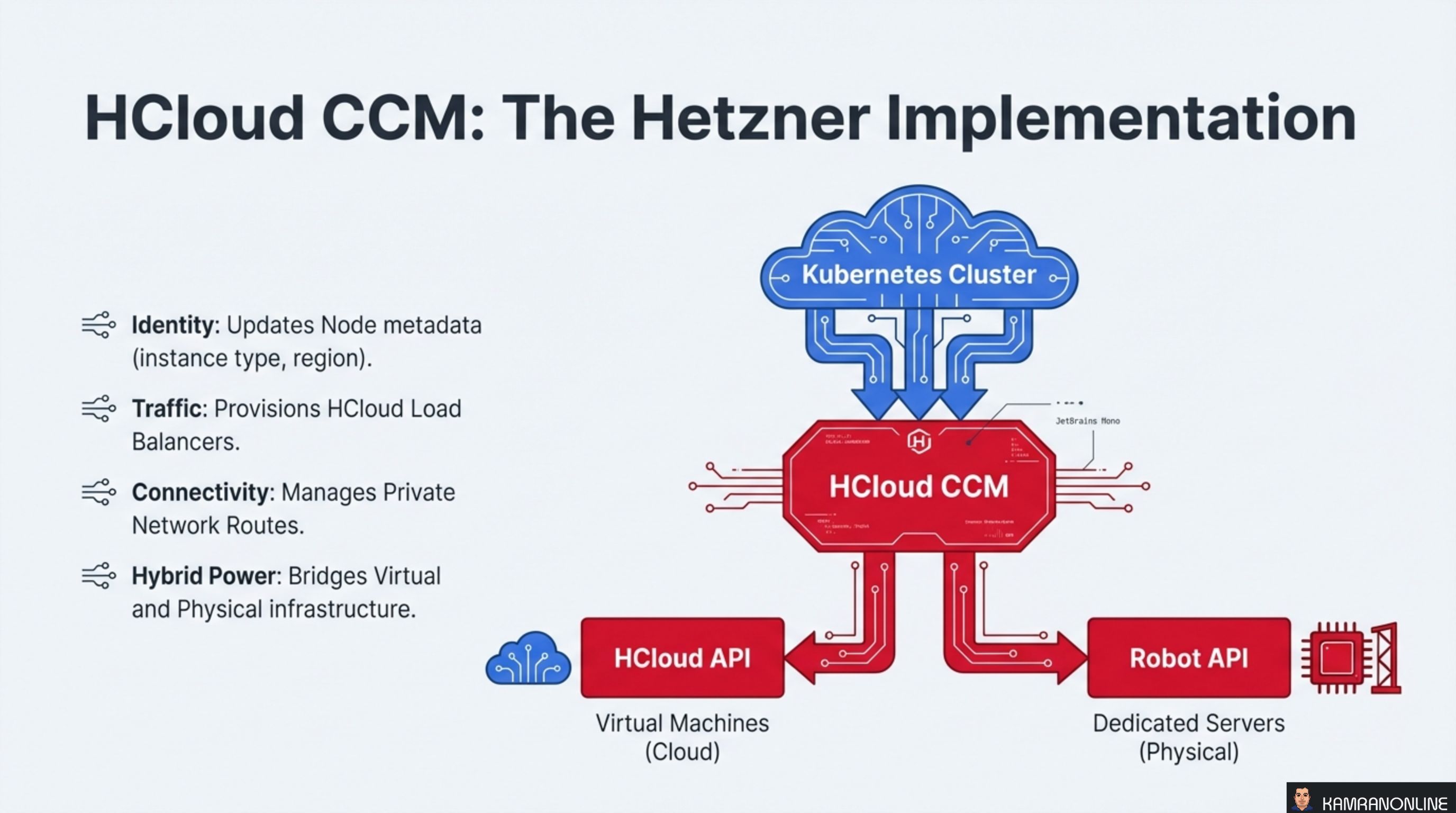
The HCloud CCM translates Kubernetes abstractions into Hetzner-specific API calls across four domains:
- Identity — updates Node metadata with Hetzner instance types, regions, and availability zones
- Traffic — provisions and configures HCloud Load Balancers when Services of type
LoadBalancerare created - Connectivity — manages Private Network routes for pod-to-pod communication across nodes
- Hybrid Power — bridges virtual machines (HCloud API) and physical dedicated servers (Robot API) into a single Kubernetes cluster
The dual-API support is a distinguishing feature. The HCloud CCM talks to both the HCloud API (for cloud VMs) and the Robot API (for dedicated bare-metal servers), enabling hybrid clusters that mix compute types.
The Node Controller: Identity and Lifecycle
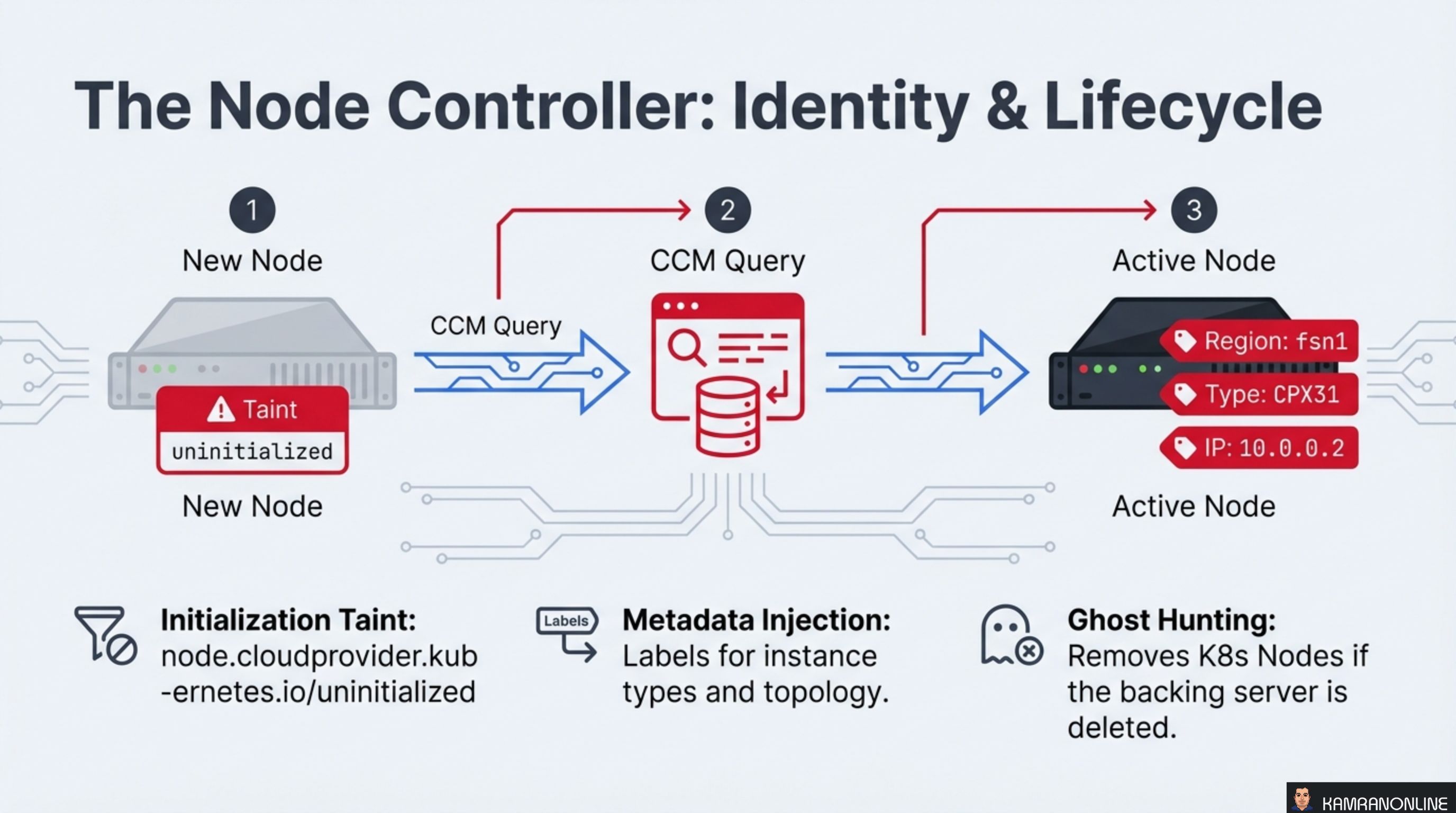
When a new node joins the cluster, it goes through a three-step initialization:
-
New Node — the node registers with the API server carrying a taint:
node.cloudprovider.kubernetes.io/uninitialized. This taint prevents any workloads from being scheduled until the CCM has verified the node. -
CCM Query — the CCM queries the Hetzner API to retrieve the server’s metadata: instance type, region, IP addresses, and topology labels.
-
Active Node — the CCM injects this metadata as labels (e.g.,
Region: fsn1,Type: CPX31,IP: 10.0.0.2), removes the initialization taint, and the node becomes schedulable.
Beyond initialization, the Node Controller performs two ongoing tasks:
- Metadata Injection — labels for instance types and topology are kept in sync with the Hetzner API
- Ghost Hunting — if a backing server is deleted in Hetzner (e.g., someone terminates a VM in the console), the Node Controller detects the orphan and removes the stale Kubernetes Node object
The Service Controller: Annotations as Levers
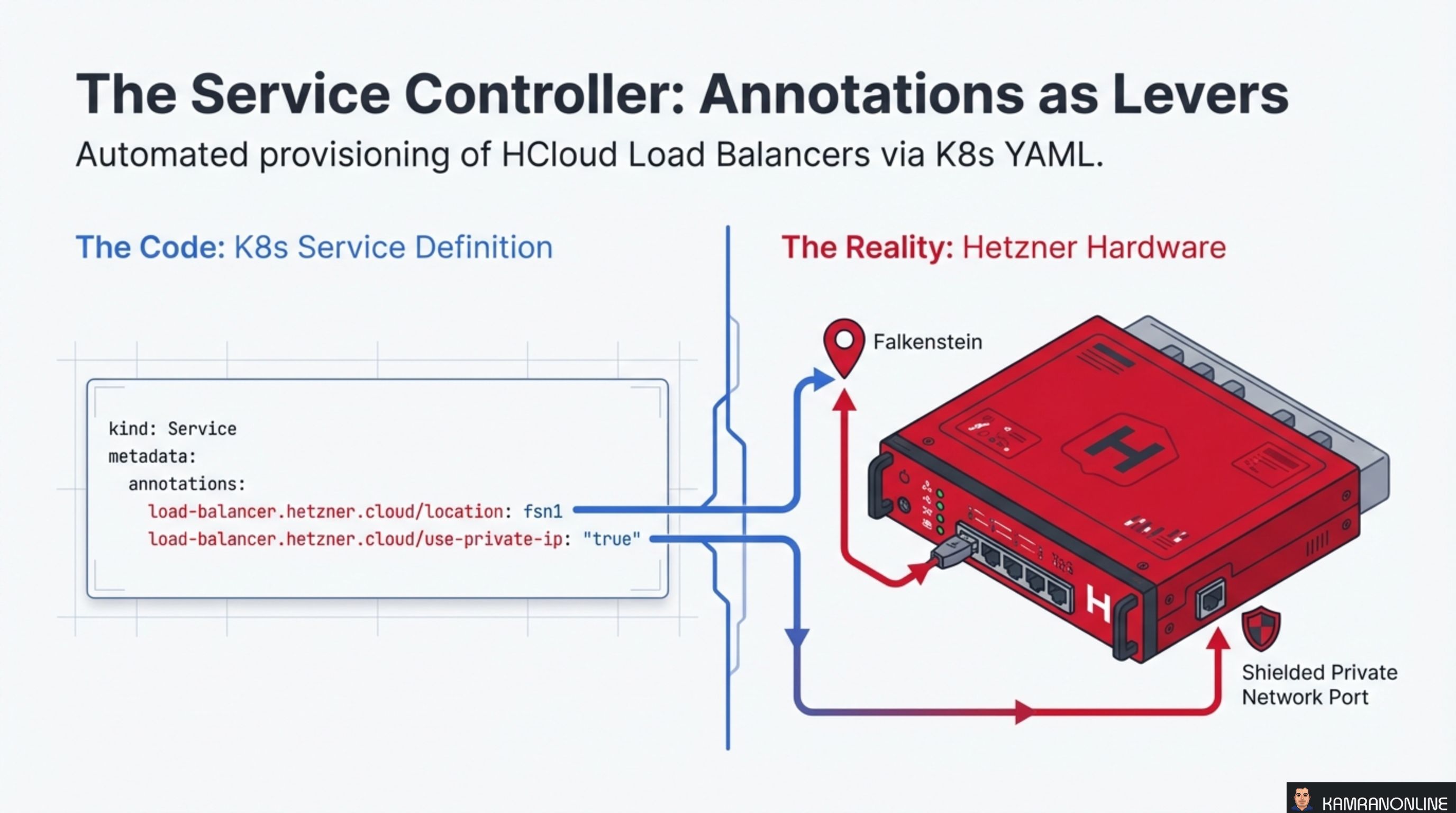
The Service Controller automates the provisioning of HCloud Load Balancers through Kubernetes Service annotations. A standard Service definition with Hetzner-specific annotations is all it takes:
kind: Service
metadata:
  annotations:
    load-balancer.hetzner.cloud/location: fsn1
    load-balancer.hetzner.cloud/use-private-ip: "true"
These annotations are the levers that control Hetzner-specific behaviour:
location: fsn1— places the load balancer in the Falkenstein data centreuse-private-ip: "true"— routes traffic over the private network instead of the public internet, improving both security and latency
The CCM watches for Services of type LoadBalancer, reads the annotations, and makes the corresponding Hetzner API calls to provision and configure the load balancer. When the Service is deleted, the load balancer is cleaned up automatically.
The Route Controller: Native Networking
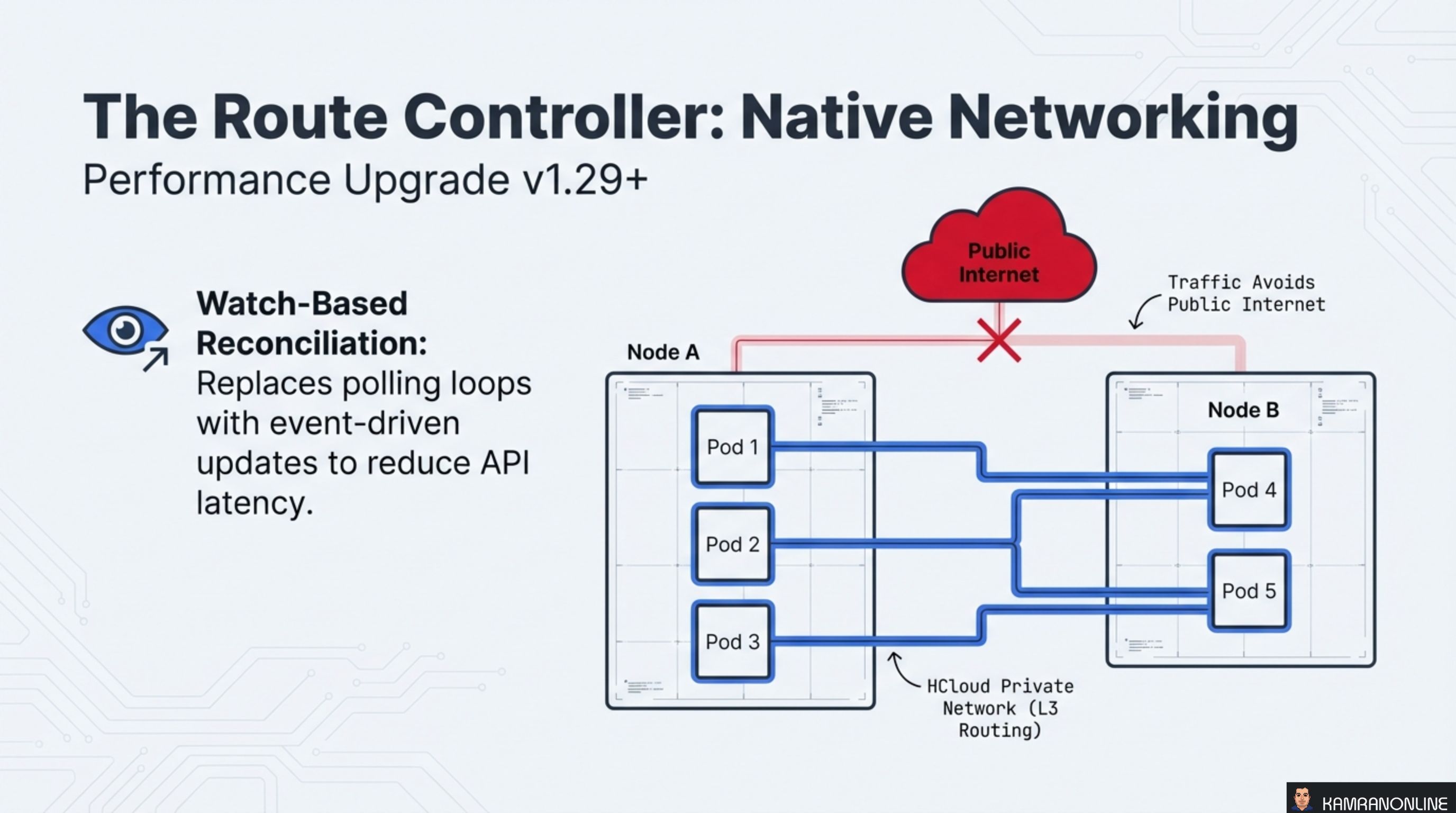
The Route Controller configures pod-to-pod networking using HCloud Private Networks with L3 routing. This means traffic between pods on different nodes flows over Hetzner’s private network infrastructure — it never touches the public internet.
Since v1.29+, the Route Controller uses watch-based reconciliation instead of polling. Rather than periodically querying the Hetzner API for route state, it subscribes to events and reconciles only when something changes. This reduces API call volume and latency significantly.
The diagram shows the key principle: pods on Node A communicate with pods on Node B through the HCloud Private Network. The public internet is bypassed entirely, which provides:
- Lower latency (private backbone vs. public routing)
- Better security (no exposure to public internet)
- Reduced bandwidth costs (private network traffic is free on Hetzner)
Hybrid Clusters: Bridging Cloud and Metal
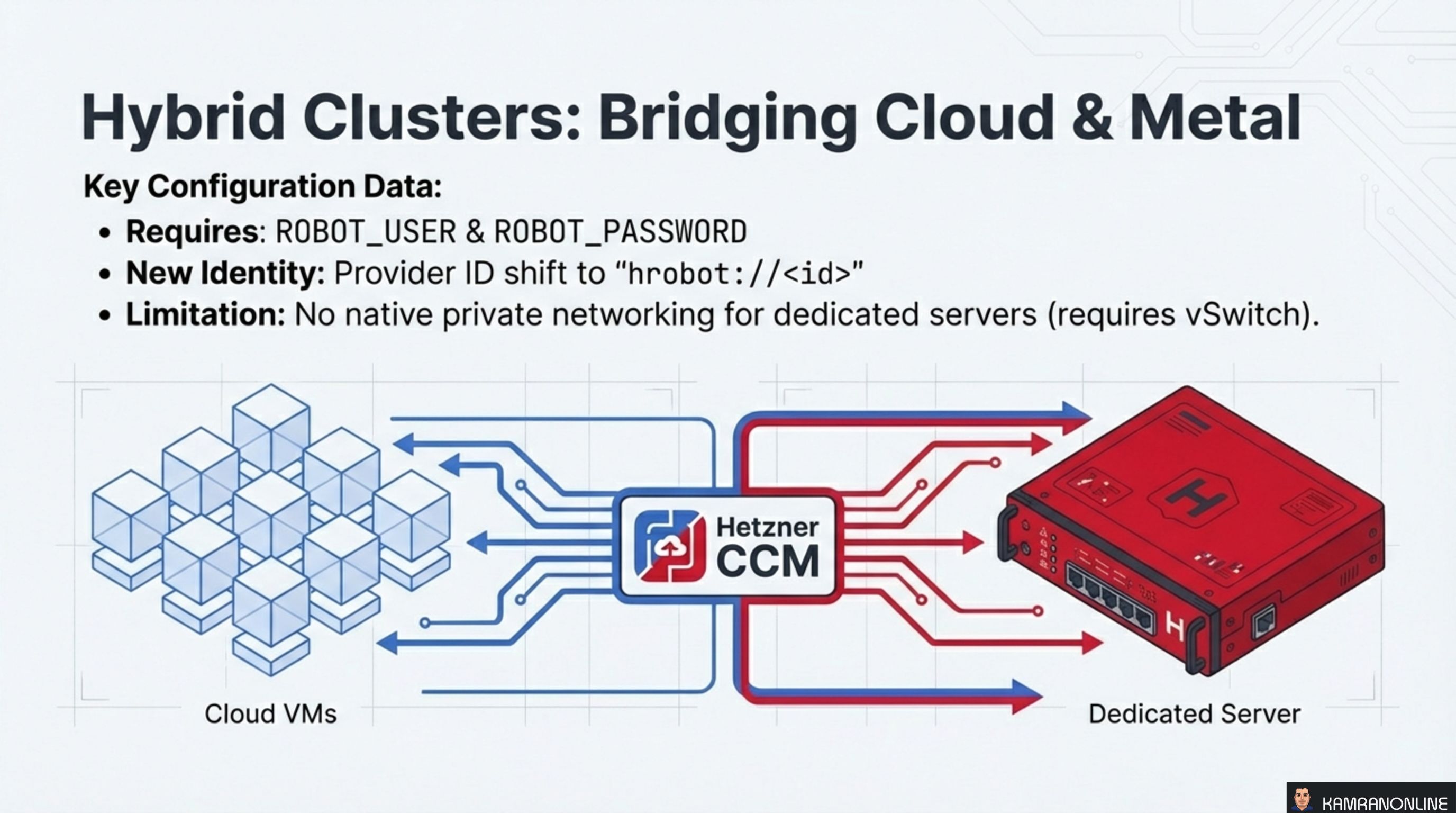
One of HCCM’s most powerful features is hybrid cluster support — running cloud VMs and dedicated bare-metal servers as nodes in the same Kubernetes cluster.
Key configuration details:
- Requires
ROBOT_USERandROBOT_PASSWORDenvironment variables for Robot API authentication - New Identity — dedicated servers use a different Provider ID format:
hrobot://<id>instead ofhcloud://<id> - Limitation — dedicated servers don’t have native private networking. You need a vSwitch to connect them to the HCloud private network
This hybrid approach is ideal for workloads that need the elasticity of cloud VMs for burst capacity combined with the raw performance and cost efficiency of dedicated servers for baseline compute.
Dynamic Scaling with Autoscaler
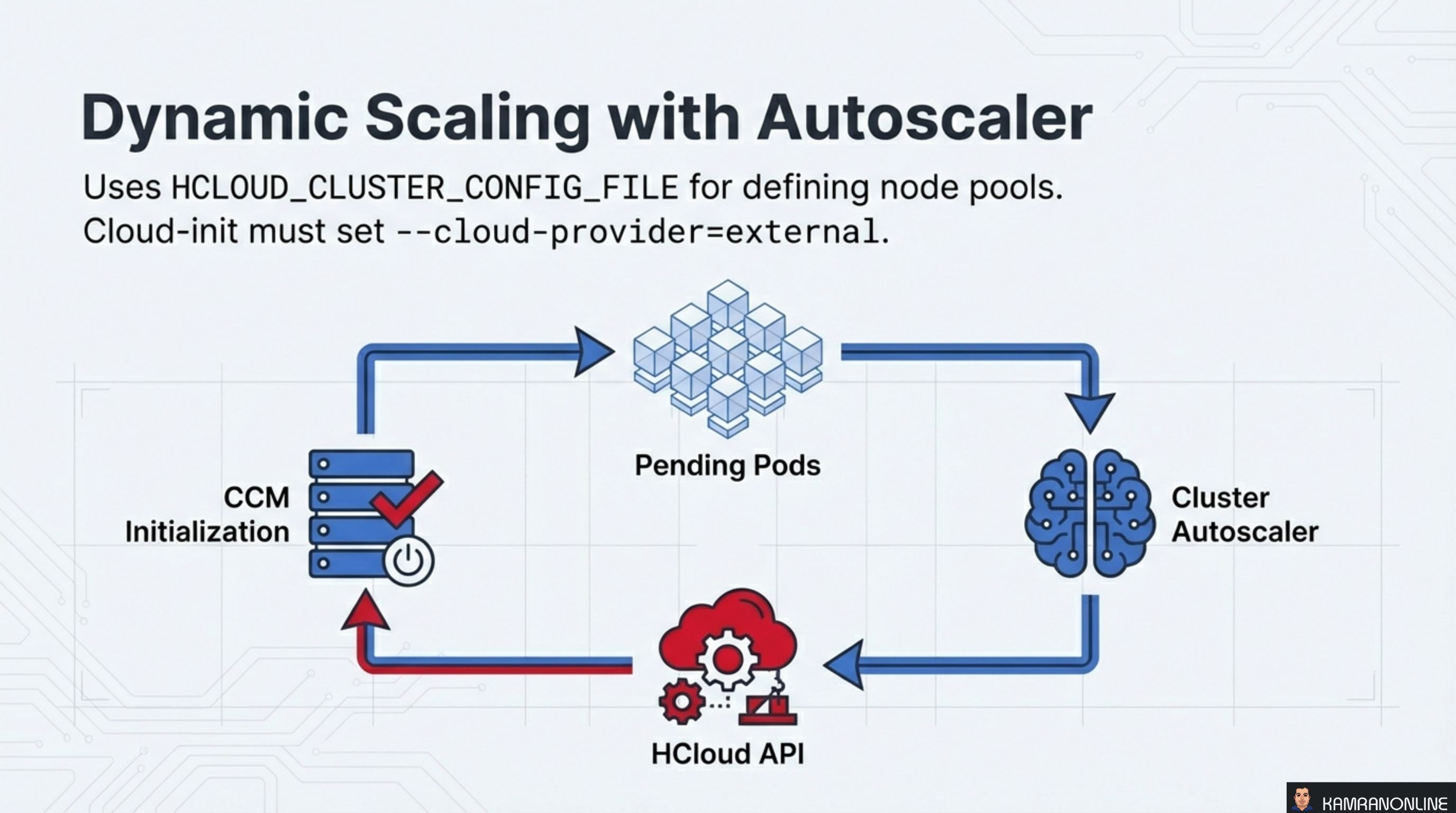
The HCCM integrates with the Kubernetes Cluster Autoscaler to dynamically add and remove nodes based on workload demand.
The scaling loop works as follows:
- Pending Pods — pods are unschedulable because the cluster lacks capacity
- Cluster Autoscaler — detects pending pods and decides to scale up
- HCloud API — the autoscaler calls the Hetzner API to provision new servers
- CCM Initialization — new servers join the cluster, the CCM initialises them (taint removal, metadata injection), and the pending pods get scheduled
Configuration requirements:
- Define node pools using
HCLOUD_CLUSTER_CONFIG_FILE - Ensure cloud-init on new nodes sets
--cloud-provider=externalso they register with the initialization taint and wait for CCM to process them
Deploying Hetzner CCM: The Bootstrap Paradox
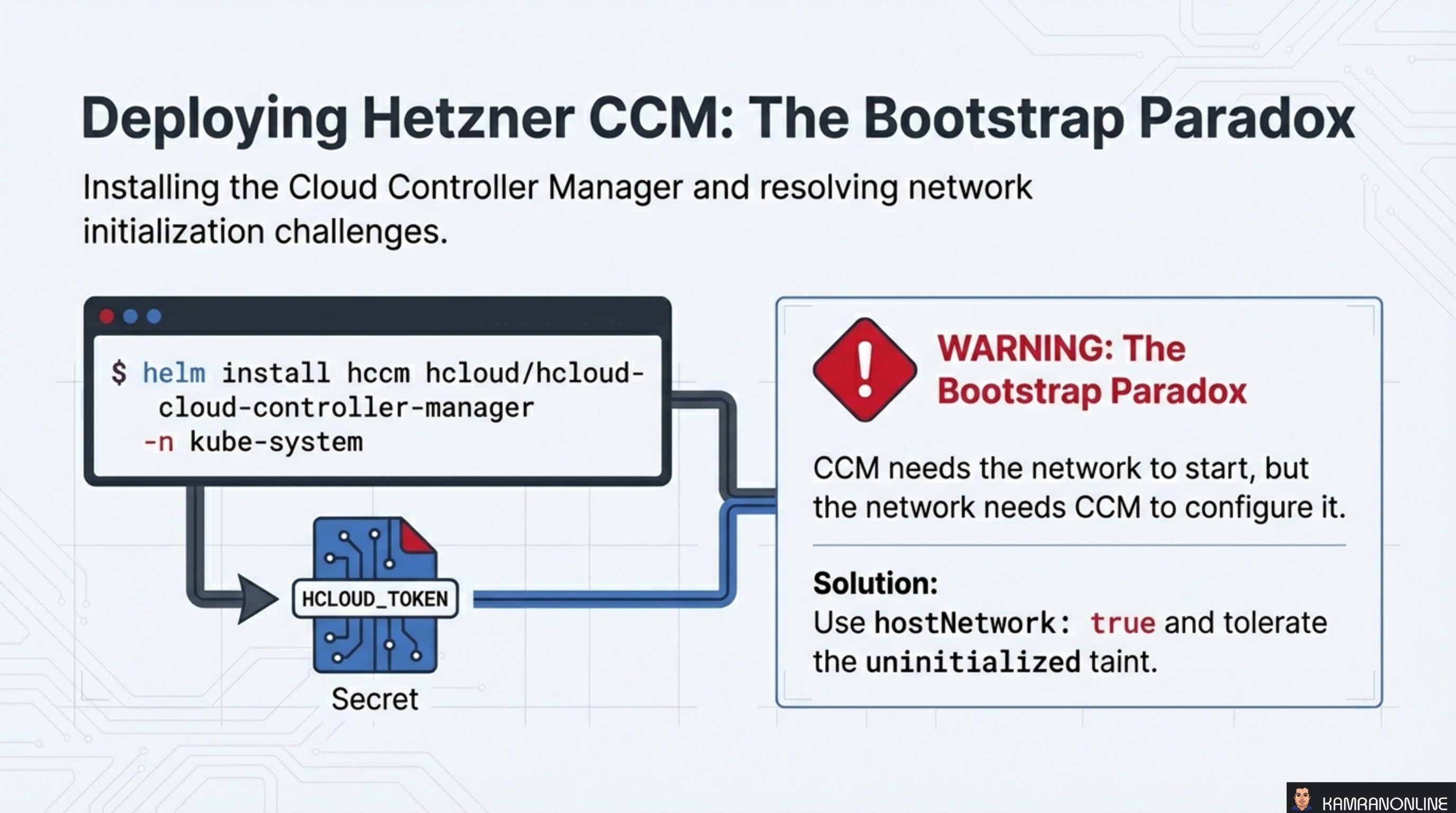
Installation is straightforward via Helm:
helm install hccm hcloud/hcloud-cloud-controller-manager \
  -n kube-system
The CCM authenticates to the Hetzner API using an HCLOUD_TOKEN stored as a Kubernetes Secret.
However, there’s a bootstrap paradox to be aware of: the CCM needs the network to start, but the network needs the CCM to configure it. New nodes join with the uninitialized taint, and the CCM needs to remove it — but if the CCM pod itself can’t be scheduled because all nodes are tainted, you have a deadlock.
The solution is two-fold:
hostNetwork: true— the CCM pod uses the host’s network stack instead of the pod network, bypassing the dependency on pod networking being configured- Tolerate the uninitialized taint — the CCM deployment includes a toleration for
node.cloudprovider.kubernetes.io/uninitialized, allowing it to be scheduled on tainted nodes
Migrating to v2.0: Critical Breaking Changes
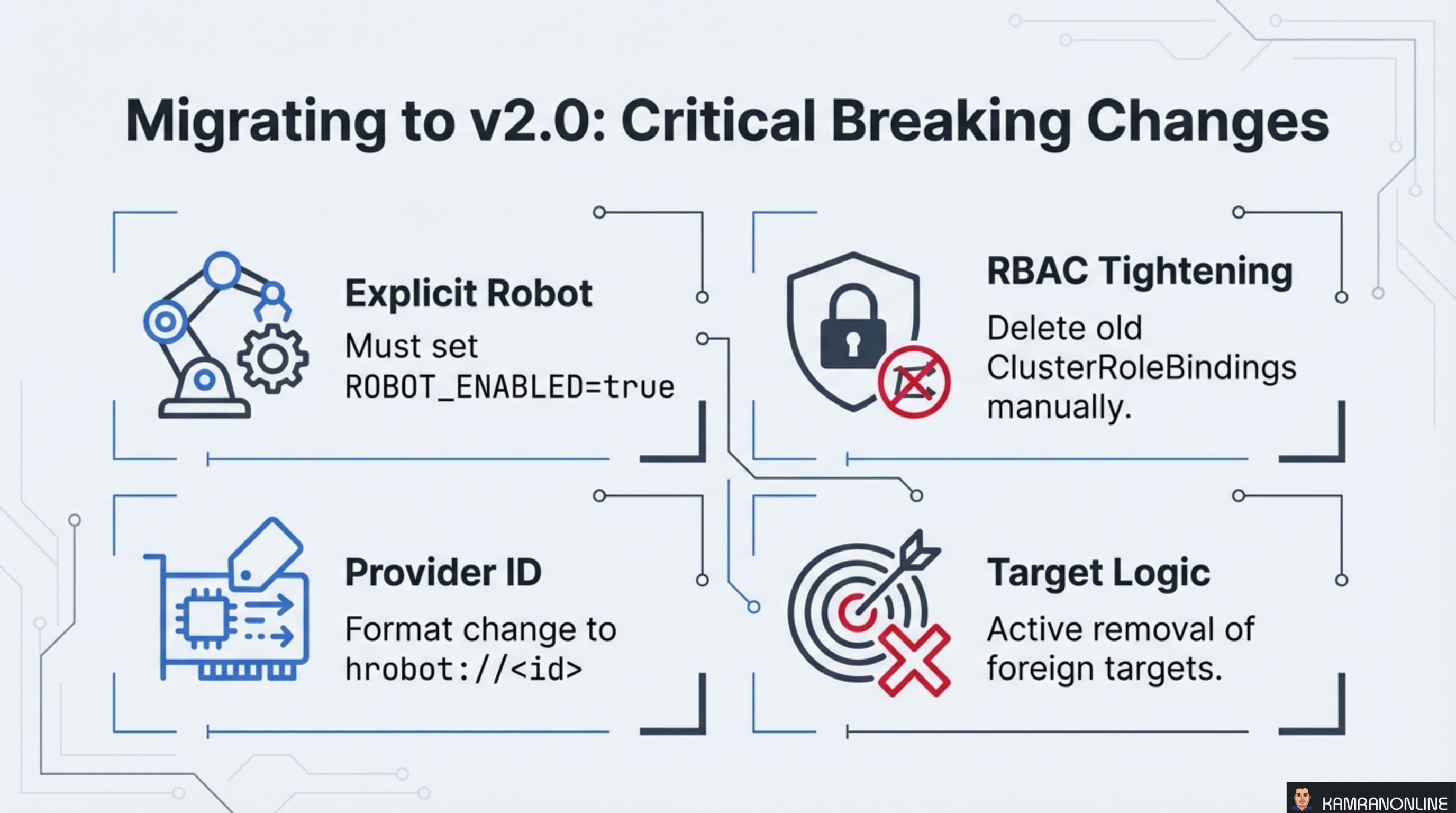
The v2.0 release introduced four breaking changes that require attention during migration:
Explicit Robot
Robot (dedicated server) support is no longer implicit. You must explicitly set ROBOT_ENABLED=true to enable it. Clusters that previously relied on automatic Robot detection will break without this flag.
RBAC Tightening
The v2.0 release ships with tighter RBAC permissions. Old ClusterRoleBindings from v1.x are not automatically removed — you must delete them manually to avoid over-permissioned service accounts lingering in your cluster.
Provider ID
The Provider ID format for dedicated servers changed to hrobot://<id>. Nodes that were previously registered with the old format need to be reconciled.
Target Logic
v2.0 actively removes foreign targets from load balancers. If you had manually added targets outside of the CCM’s management, they will be cleaned up.
Best Practices: Optimizing HCloud CCM
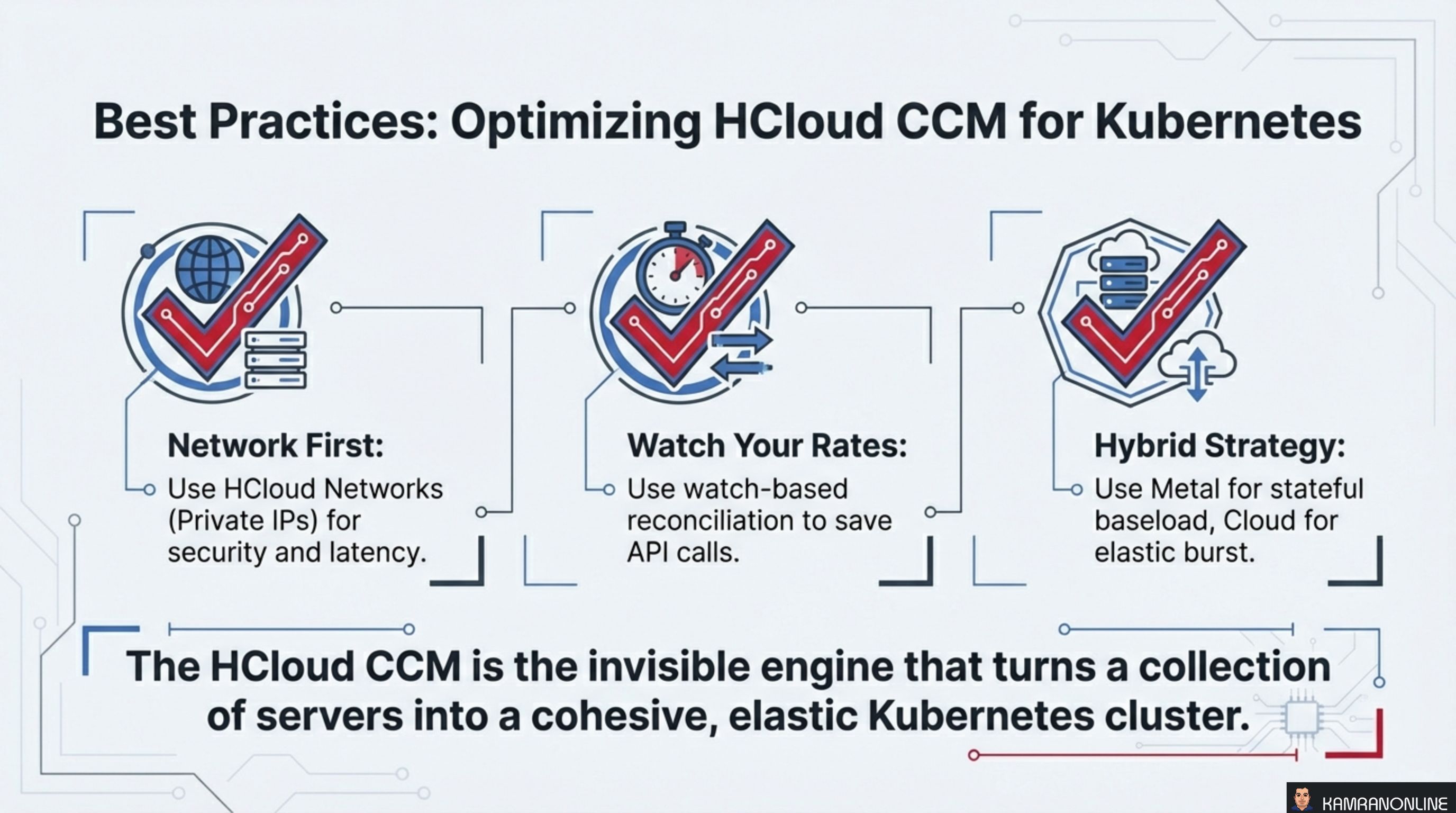
Three principles for running HCCM effectively:
-
Network First. Use HCloud Networks (private IPs) for all inter-node communication. This improves security by keeping traffic off the public internet and reduces latency by using Hetzner’s private backbone.
-
Watch Your Rates. Use watch-based reconciliation (v1.29+) to minimize Hetzner API calls. Polling-based reconciliation can hit API rate limits in large clusters, causing delayed updates and reconciliation failures.
-
Hybrid Strategy. Use dedicated metal servers for stateful baseline workloads (databases, persistent services) and cloud VMs for elastic burst capacity. This gives you the cost efficiency of bare metal where you need it and the elasticity of cloud where you need it.
The HCloud CCM is the invisible engine that turns a collection of servers into a cohesive, elastic Kubernetes cluster.
The CCM is one of those components that does its best work when you forget it exists. Nodes appear with the right labels, load balancers provision themselves from annotations, routes configure without manual intervention, and the cluster scales up and down as demand shifts. The translation layer between Kubernetes intent and Hetzner infrastructure just works.