
Deploy Production-Ready Redis Cluster on AWS ECS Fargate with Terraform
Running Redis in production requires careful consideration of high availability, scalability, and operational complexity. While AWS ElastiCache provides a managed Redis solution, it comes with vendor lock-in and limited customization options. Traditional EC2-based deployments offer flexibility but require significant operational overhead for patching, scaling, and cluster management.
In this comprehensive guide, I’ll show you how to deploy a production-ready Redis cluster on AWS ECS Fargate using Terraform, combining the best of both worlds: the operational simplicity of serverless containers with the flexibility of self-managed Redis.
The Challenge: Redis Deployment Options on AWS
When deploying Redis on AWS, teams typically face three options, each with trade-offs:
1. AWS ElastiCache
Pros:
- Fully managed service
- Automated backups and patching
- Built-in monitoring
Cons:
- Vendor lock-in
- Limited configuration flexibility
- Higher costs for production workloads
- No control over Redis version and modules
2. Self-Managed on EC2
Pros:
- Full control over configuration
- Cost-effective at scale
- Custom Redis modules support
Cons:
- Operational overhead (patching, scaling, monitoring)
- Manual cluster setup and management
- Infrastructure management complexity
3. ECS Fargate with CloudMap (This Solution)
Pros:
- Serverless container management (no EC2 patching)
- Automatic service discovery via CloudMap
- Infrastructure as Code with Terraform
- Cost-effective with pay-per-use pricing
- Full Redis configuration control
Cons:
- Requires initial setup complexity
- Cluster initialization needs orchestration
This Terraform module addresses the third option, providing a production-ready, self-managed Redis cluster running on ECS Fargate with automatic cluster initialization and CloudMap-based service discovery.
Architecture Overview
The solution leverages several AWS services working together:
┌─────────────────────────────────────────────────────────────────┐
│                         Application Layer                        │
│  (Python/Node.js/Go apps connecting via CloudMap DNS)           │
└────────────────────┬────────────────────────────────────────────┘
                     │
                     ▼
┌─────────────────────────────────────────────────────────────────┐
│                    AWS CloudMap (Service Discovery)              │
│            redis-cluster.local → 6 Redis endpoints               │
└────────────────────┬────────────────────────────────────────────┘
                     │
                     ▼
┌─────────────────────────────────────────────────────────────────┐
│                         ECS Fargate Cluster                      │
│  ┌──────────────┐  ┌──────────────┐  ┌──────────────┐          │
│  │ Master Node 1│  │ Master Node 2│  │ Master Node 3│          │
│  │  Port: 6379  │  │  Port: 6379  │  │  Port: 6379  │          │
│  └──────────────┘  └──────────────┘  └──────────────┘          │
│  ┌──────────────┐  ┌──────────────┐  ┌──────────────┐          │
│  │ Replica 1    │  │ Replica 2    │  │ Replica 3    │          │
│  │  Port: 6379  │  │  Port: 6379  │  │  Port: 6379  │          │
│  └──────────────┘  └──────────────┘  └──────────────┘          │
└────────────────────┬────────────────────────────────────────────┘
                     │
                     ▼
┌─────────────────────────────────────────────────────────────────┐
│              Lambda Function (Cluster Initializer)               │
│  • Discovers all Redis nodes via CloudMap                        │
│  • Creates cluster configuration                                 │
│  • Assigns hash slots to masters                                 │
│  • Configures master-replica relationships                       │
└─────────────────────────────────────────────────────────────────┘
Key Components:
- ECS Fargate Tasks: Run Redis containers without managing servers
- CloudMap Service Discovery: Provides DNS-based service discovery for Redis nodes
- Lambda Initializer: Automatically configures cluster topology and hash slot distribution
- VPC Networking: Isolated network with security groups controlling access
- CloudWatch Monitoring: Logs and metrics for all components
The Cluster Initialization Challenge
One of the most complex aspects of deploying Redis Cluster is initialization. Redis Cluster requires:
- Discovery: All nodes must discover each other
- Hash Slot Assignment: 16,384 hash slots distributed across master nodes
- Replication: Each master must have replicas assigned
- Health Checking: Ensuring cluster is properly formed
Traditional approaches using redis-cli --cluster create assume you know all node IPs upfront, which doesn’t work well in dynamic container environments where:
- Container IPs change on restart
- Tasks may start asynchronously
- CloudMap DNS takes time to propagate
The Lambda Solution
This module includes a Lambda function that automatically:
- Discovers all Redis nodes via CloudMap API
- Waits for all nodes to be healthy and reachable
- Creates cluster configuration with proper hash slot distribution
- Assigns replicas to masters for high availability
- Validates cluster health before completing
The Lambda function is triggered automatically when the ECS service reaches its desired count, ensuring zero-touch cluster initialization.
Module Features
🚀 Core Features
- Production-Ready Cluster: 3 master + 3 replica configuration out of the box
- Automatic Initialization: Lambda-based cluster setup with zero manual intervention
- Service Discovery: CloudMap DNS for seamless application integration
- High Availability: Multi-AZ deployment with automatic failover
- Serverless Infrastructure: No EC2 instances to patch or manage
- Infrastructure as Code: Complete Terraform module with all resources
- Security: VPC isolation, security groups, and IAM roles with least privilege
📊 Monitoring & Observability
- CloudWatch Logs for all Redis containers
- CloudWatch Logs for Lambda initialization function
- ECS task health monitoring
- Automatic restart on failures
- Custom CloudWatch metrics (optional)
🔧 Customization Options
- Configurable Redis version
- Adjustable CPU and memory allocations
- Custom Redis configuration parameters
- Network isolation controls
- Custom CloudMap namespace
Prerequisites
Before deploying this module, ensure you have:
- AWS Account with appropriate permissions
- Terraform >= 1.0
- VPC with private subnets (for ECS tasks)
- Basic understanding of Redis Cluster architecture
Quick Start: Deploy Redis Cluster in 5 Minutes
Step 1: Create Terraform Configuration
Create a new directory and add main.tf:
terraform {
  required_version = ">= 1.0"

  required_providers {
    aws = {
      source  = "hashicorp/aws"
      version = "~> 5.0"
    }
  }
}

provider "aws" {
  region = "us-east-1"
}

# Use existing VPC and subnets
data "aws_vpc" "main" {
  id = "vpc-xxxxxxxxxxxxx"  # Replace with your VPC ID
}

data "aws_subnets" "private" {
  filter {
    name   = "vpc-id"
    values = [data.aws_vpc.main.id]
  }

  filter {
    name   = "tag:Type"
    values = ["private"]
  }
}

module "redis_cluster" {
  source  = "KamranBiglari/containerize-redis/aws"
  version = "~> 1.0"

  # Cluster Configuration
  cluster_name     = "my-redis-cluster"
  redis_version    = "7.2"

  # Network Configuration
  vpc_id             = data.aws_vpc.main.id
  private_subnet_ids = data.aws_subnets.private.ids

  # CloudMap Configuration
  cloudmap_namespace = "redis-cluster.local"

  # Capacity
  master_count  = 3
  replica_count = 3

  # Task Resources
  task_cpu    = 1024  # 1 vCPU
  task_memory = 2048  # 2 GB

  # Optional: Custom Redis Configuration
  redis_config = {
    maxmemory_policy = "allkeys-lru"
    timeout          = 300
  }

  tags = {
    Environment = "production"
    ManagedBy   = "terraform"
  }
}

# Outputs
output "cloudmap_service_name" {
  value       = module.redis_cluster.cloudmap_service_name
  description = "CloudMap service name for DNS discovery"
}

output "redis_connection_string" {
  value       = "redis://${module.redis_cluster.cloudmap_service_name}:6379"
  description = "Redis connection string for applications"
}

output "cluster_endpoints" {
  value       = module.redis_cluster.cluster_endpoints
  description = "List of all Redis cluster endpoints"
}
Step 2: Deploy the Infrastructure
# Initialize Terraform
terraform init

# Review the planned changes
terraform plan

# Deploy the Redis cluster
terraform apply -auto-approve
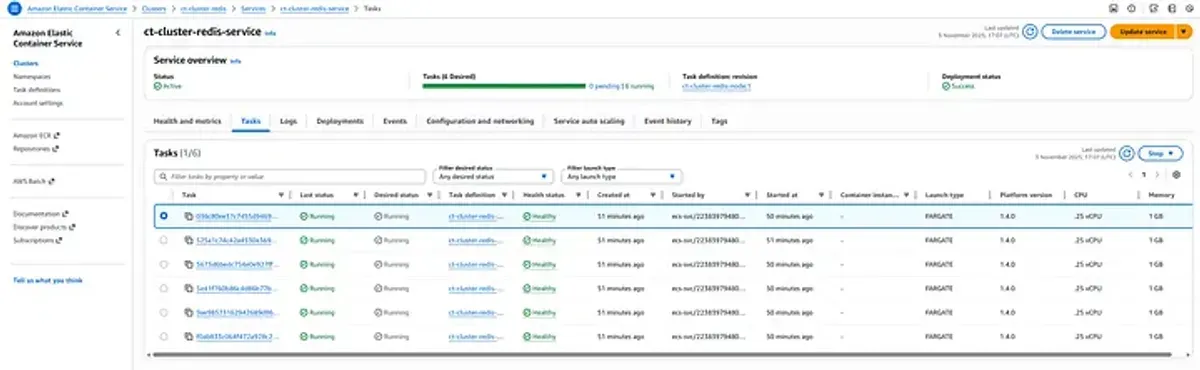
The deployment takes approximately 3-5 minutes and includes:
- Creating ECS cluster and task definitions
- Launching 6 Fargate tasks (3 masters + 3 replicas)
- Setting up CloudMap service discovery
- Registering all nodes in CloudMap
- Triggering Lambda function for cluster initialization
- Validating cluster health
Step 3: Verify Deployment
Check the cluster status:
# Get the CloudMap service name
REDIS_SERVICE=$(terraform output -raw cloudmap_service_name)

# Check ECS service status
aws ecs describe-services \
  --cluster my-redis-cluster \
  --services redis-cluster-service

# Check Lambda initialization logs
aws logs tail /aws/lambda/redis-cluster-initializer --follow

# Connect to cluster and verify
aws ecs execute-command \
  --cluster my-redis-cluster \
  --task <task-id> \
  --container redis \
  --interactive \
  --command "redis-cli cluster info"
Expected output:
cluster_state:ok
cluster_slots_assigned:16384
cluster_slots_ok:16384
cluster_slots_pfail:0
cluster_slots_fail:0
cluster_known_nodes:6
cluster_size:3
Application Integration Examples
Once deployed, applications can connect to the Redis cluster using the CloudMap DNS name.
Python (redis-py-cluster)
from rediscluster import RedisCluster

# Connect using CloudMap DNS
startup_nodes = [
    {"host": "redis-cluster.local", "port": "6379"}
]

redis_client = RedisCluster(
    startup_nodes=startup_nodes,
    decode_responses=True,
    skip_full_coverage_check=True,
    max_connections_per_node=50
)

# Use the cluster
redis_client.set("user:1000", "John Doe")
user = redis_client.get("user:1000")
print(f"User: {user}")

# Hash operations (automatically distributed across shards)
redis_client.hset("user:1001", mapping={
    "name": "Jane Smith",
    "email": "[email protected]",
    "age": 30
})

user_data = redis_client.hgetall("user:1001")
print(f"User data: {user_data}")
Node.js (ioredis)
const Redis = require('ioredis');

// Create cluster client
const cluster = new Redis.Cluster([
  {
    host: 'redis-cluster.local',
    port: 6379
  }
], {
  redisOptions: {
    password: process.env.REDIS_PASSWORD, // If using AUTH
    tls: {} // If using TLS
  },
  clusterRetryStrategy: (times) => {
    return Math.min(100 * times, 2000);
  }
});

// Event handlers
cluster.on('connect', () => {
  console.log('Connected to Redis Cluster');
});

cluster.on('error', (err) => {
  console.error('Redis Cluster error:', err);
});

// Use the cluster
async function example() {
  // Set/Get operations
  await cluster.set('session:abc123', JSON.stringify({
    userId: 1000,
    loginTime: Date.now()
  }));

  const session = await cluster.get('session:abc123');
  console.log('Session:', JSON.parse(session));

  // Pipeline for multiple operations
  const pipeline = cluster.pipeline();
  pipeline.set('counter:1', 100);
  pipeline.incr('counter:1');
  pipeline.get('counter:1');
  const results = await pipeline.exec();
  console.log('Pipeline results:', results);

  // Pub/Sub (works across cluster)
  const subscriber = cluster.duplicate();
  subscriber.subscribe('notifications', (err, count) => {
    console.log(`Subscribed to ${count} channel(s)`);
  });

  subscriber.on('message', (channel, message) => {
    console.log(`Received message from ${channel}:`, message);
  });

  // Publish from another connection
  await cluster.publish('notifications', 'Hello from Node.js!');
}

example();
Go (go-redis)
package main

import (
    "context"
    "fmt"
    "time"

    "github.com/go-redis/redis/v8"
)

func main() {
    ctx := context.Background()

    // Create cluster client
    rdb := redis.NewClusterClient(&redis.ClusterOptions{
        Addrs: []string{
            "redis-cluster.local:6379",
        },

        // Connection pool settings
        PoolSize:     50,
        MinIdleConns: 10,

        // Timeouts
        DialTimeout:  5 * time.Second,
        ReadTimeout:  3 * time.Second,
        WriteTimeout: 3 * time.Second,

        // Retry settings
        MaxRetries: 3,
    })

    // Ping to verify connection
    pong, err := rdb.Ping(ctx).Result()
    if err != nil {
        panic(err)
    }
    fmt.Println("Connected to Redis:", pong)

    // Basic operations
    err = rdb.Set(ctx, "user:1000", "John Doe", 0).Err()
    if err != nil {
        panic(err)
    }

    val, err := rdb.Get(ctx, "user:1000").Result()
    if err != nil {
        panic(err)
    }
    fmt.Println("user:1000:", val)

    // Hash operations
    err = rdb.HSet(ctx, "product:500", map[string]interface{}{
        "name":  "Laptop",
        "price": 999.99,
        "stock": 50,
    }).Err()
    if err != nil {
        panic(err)
    }

    product, err := rdb.HGetAll(ctx, "product:500").Result()
    if err != nil {
        panic(err)
    }
    fmt.Printf("Product: %+v\n", product)

    // Transaction with Watch (optimistic locking)
    txf := func(tx *redis.Tx) error {
        // Get current value
        val, err := tx.Get(ctx, "counter").Int()
        if err != nil && err != redis.Nil {
            return err
        }

        // Increment
        val++

        // Commit transaction
        _, err = tx.TxPipelined(ctx, func(pipe redis.Pipeliner) error {
            pipe.Set(ctx, "counter", val, 0)
            return nil
        })
        return err
    }

    // Execute transaction with retries
    for i := 0; i < 100; i++ {
        err = rdb.Watch(ctx, txf, "counter")
        if err == nil {
            break
        }
        if err == redis.TxFailedErr {
            // Retry on concurrent modification
            continue
        }
        panic(err)
    }

    fmt.Println("Transaction completed successfully")
}
Advanced Configuration
Custom Redis Configuration
The module supports custom Redis configuration parameters:
module "redis_cluster" {
  source = "KamranBiglari/containerize-redis/aws"

  # ... other configuration ...

  redis_config = {
    # Memory Management
    maxmemory                = "1.5gb"
    maxmemory_policy         = "allkeys-lru"
    maxmemory_samples        = 5

    # Persistence
    save                     = "900 1 300 10 60 10000"
    appendonly               = "yes"
    appendfsync              = "everysec"

    # Network
    timeout                  = 300
    tcp_keepalive            = 60

    # Cluster
    cluster_node_timeout     = 15000
    cluster_replica_validity_factor = 10

    # Performance
    slowlog_log_slower_than  = 10000
    slowlog_max_len          = 128

    # Security (if needed)
    requirepass              = "your-secure-password"
  }
}
High-Memory Configuration
For cache-intensive workloads:
module "redis_cluster" {
  source = "KamranBiglari/containerize-redis/aws"

  cluster_name = "cache-cluster"

  # Larger tasks for caching workload
  task_cpu    = 4096  # 4 vCPU
  task_memory = 8192  # 8 GB

  # More replicas for read scalability
  master_count  = 3
  replica_count = 6  # 2 replicas per master

  redis_config = {
    maxmemory_policy = "allkeys-lru"
    maxmemory        = "7gb"  # Leave 1GB for overhead
  }
}
Multi-Environment Setup
locals {
  environments = {
    dev = {
      task_cpu    = 512
      task_memory = 1024
      masters     = 1
      replicas    = 1
    }
    staging = {
      task_cpu    = 1024
      task_memory = 2048
      masters     = 2
      replicas    = 2
    }
    production = {
      task_cpu    = 2048
      task_memory = 4096
      masters     = 3
      replicas    = 6
    }
  }

  env = local.environments[var.environment]
}

module "redis_cluster" {
  source = "KamranBiglari/containerize-redis/aws"

  cluster_name = "redis-${var.environment}"

  task_cpu    = local.env.task_cpu
  task_memory = local.env.task_memory

  master_count  = local.env.masters
  replica_count = local.env.replicas

  # ... other configuration ...
}
Security Best Practices
1. Network Isolation
The module creates Redis tasks in private subnets only:
module "redis_cluster" {
  source = "KamranBiglari/containerize-redis/aws"

  # Only private subnets - no public access
  private_subnet_ids = data.aws_subnets.private.ids

  # Custom security group rules
  allowed_cidr_blocks = [
    "10.0.0.0/8"  # Only allow internal VPC traffic
  ]
}
2. Enable Redis AUTH
module "redis_cluster" {
  source = "KamranBiglari/containerize-redis/aws"

  redis_config = {
    requirepass = var.redis_password  # Store in AWS Secrets Manager
  }
}
Application configuration:
# Python
redis_client = RedisCluster(
    startup_nodes=[{"host": "redis-cluster.local", "port": "6379"}],
    password=os.environ["REDIS_PASSWORD"]
)
3. Enable Encryption in Transit
For TLS/SSL support, customize the Redis container:
module "redis_cluster" {
  source = "KamranBiglari/containerize-redis/aws"

  # Use custom Redis image with TLS support
  redis_image = "redis:7.2-alpine"

  redis_config = {
    tls_port            = 6380
    port                = 0  # Disable non-TLS
    tls_cert_file       = "/certs/redis.crt"
    tls_key_file        = "/certs/redis.key"
    tls_ca_cert_file    = "/certs/ca.crt"
  }
}
4. IAM Task Role Permissions
The module creates least-privilege IAM roles:
- ECS Task Role: Only CloudMap registration permissions
- Lambda Role: CloudMap discovery + ECS task management
- Task Execution Role: ECR pull + CloudWatch Logs write
5. CloudWatch Logs Encryption
module "redis_cluster" {
  source = "KamranBiglari/containerize-redis/aws"

  enable_cloudwatch_logs = true
  cloudwatch_kms_key_id  = aws_kms_key.logs.arn

  # ... other configuration ...
}
Monitoring and Observability
CloudWatch Metrics
Monitor key Redis metrics:
# Create CloudWatch dashboard
aws cloudwatch put-dashboard \
  --dashboard-name redis-cluster-monitoring \
--dashboard-body file://dashboard.jsondashboard.json:
{
  "widgets": [
    {
      "type": "metric",
      "properties": {
        "metrics": [
          ["AWS/ECS", "CPUUtilization", {"stat": "Average"}],
          [".", "MemoryUtilization", {"stat": "Average"}]
        ],
        "period": 300,
        "stat": "Average",
        "region": "us-east-1",
        "title": "ECS Resource Utilization"
      }
    },
    {
      "type": "log",
      "properties": {
        "query": "SOURCE '/aws/ecs/redis-cluster'\n| fields @timestamp, @message\n| filter @message like /cluster/\n| sort @timestamp desc\n| limit 100",
        "region": "us-east-1",
        "title": "Redis Cluster Logs"
      }
    }
  ]
}
Custom Redis Metrics
Export Redis metrics to CloudWatch using a sidecar container:
# Add redis-exporter sidecar in task definition
container_definitions = [
  {
    name  = "redis"
    image = "redis:7.2"
    # ... Redis configuration ...
  },
  {
    name  = "redis-exporter"
    image = "oliver006/redis_exporter:latest"
    environment = [
      {
        name  = "REDIS_ADDR"
        value = "localhost:6379"
      }
    ]
    portMappings = [
      {
        containerPort = 9121
        protocol      = "tcp"
      }
    ]
  }
]
Log Analysis
Query CloudWatch Logs Insights:
# Find slow queries
fields @timestamp, @message
| filter @message like /slowlog/
| sort @timestamp desc
| limit 20

# Monitor cluster state changes
fields @timestamp, @message
| filter @message like /cluster state/
| sort @timestamp desc

# Track replication lag
fields @timestamp, @message
| filter @message like /repl_backlog/
| parse @message /repl_backlog_size:(?<backlog_size>\d+)/
| stats avg(backlog_size) by bin(5m)
Troubleshooting Common Issues
Issue 1: Cluster Initialization Fails
Symptoms:
- Lambda function times out
- Cluster state shows “fail”
- ECS tasks are running but cluster not formed
Diagnosis:
# Check Lambda logs
aws logs tail /aws/lambda/redis-cluster-initializer --follow

# Check if all tasks are registered in CloudMap
aws servicediscovery list-instances \
  --service-id <service-id>

# Connect to a Redis node and check cluster status
redis-cli -h <node-ip> cluster nodes
Solutions:
-
Not all nodes discovered:
- Wait for CloudMap DNS propagation (30-60 seconds)
- Increase Lambda timeout in module configuration
-
Network connectivity issues:
- Verify security groups allow port 6379 between tasks
- Check VPC DNS resolution is enabled
-
Lambda execution role permissions:
- Verify Lambda has CloudMap and ECS permissions
Issue 2: High Memory Usage
Symptoms:
- Tasks being OOM killed
- Eviction counter increasing
- Application errors
Diagnosis:
# Check memory stats
redis-cli -h redis-cluster.local info memory

# Output:
# used_memory:1500000000
# used_memory_human:1.40G
# maxmemory:2147483648
# maxmemory_human:2.00G
Solutions:
-
Increase task memory:
task_memory = 4096 # Increase from 2048 -
Configure maxmemory policy:
redis_config = { maxmemory_policy = "allkeys-lru" maxmemory = "3.5gb" # Leave headroom } -
Enable data persistence and eviction:
redis_config = {
  save     = "900 1 300 10"
  appendonly = "yes"
}
Issue 3: Connection Timeouts
Symptoms:
- Applications timing out connecting to Redis
- Intermittent connection failures
Diagnosis:
# Test CloudMap DNS resolution
dig redis-cluster.local

# Check security group rules
aws ec2 describe-security-groups \
  --group-ids <redis-sg-id>

# Test direct connection to a node
redis-cli -h <node-ip> ping
Solutions:
-
Update security groups:
- Ensure application security group is allowed in Redis security group
- Verify port 6379 is open
-
Increase connection timeouts:
# Python redis_client = RedisCluster( startup_nodes=nodes, socket_connect_timeout=5, socket_timeout=5 ) -
Check CloudMap health checks:
- Verify ECS tasks are passing health checks
- Review task health in ECS console
Issue 4: Replica Lag
Symptoms:
- Stale reads from replicas
- Replication offset mismatch
Diagnosis:
# Check replication status
redis-cli -h redis-cluster.local info replication

# Check each replica
redis-cli -h <replica-ip> info replication
Solutions:
-
Increase replica resources:
task_cpu = 2048 # More CPU for faster replication task_memory = 4096 -
Tune replication settings:
redis_config = {
  repl_backlog_size   = "256mb"
  repl_timeout        = 60
}
Cost Optimization
Fargate Pricing Breakdown
Example Configuration:
- 3 masters: 1 vCPU, 2 GB RAM each
- 3 replicas: 1 vCPU, 2 GB RAM each
- Region: us-east-1
Monthly Cost Calculation:
Per task cost (1 vCPU, 2 GB):
- vCPU: $0.04048 per hour
- Memory: $0.004445 per GB per hour
- Total per task: $0.04048 + ($0.004445 × 2) = $0.04937/hour

6 tasks running 24/7:
$0.04937 × 6 × 730 hours = ~$216/month

Plus:
- CloudMap: $0.50/month per service
- CloudWatch Logs: ~$5-10/month
- Lambda: <$1/month (initialization only)

Total: ~$222/month
vs ElastiCache:
- cache.r6g.large (2 vCPU, 13.07 GB): $0.189/hour × 6 nodes = $827/month
Savings: ~73%
Cost Optimization Tips
-
Use Fargate Spot for non-production:
capacity_provider_strategy = [ { capacity_provider = "FARGATE_SPOT" weight = 100 } ] # Potential savings: up to 70% -
Right-size tasks:
- Start with minimal resources
- Monitor and adjust based on actual usage
-
Enable data persistence and reduce cluster size:
- Use fewer, larger nodes if acceptable
- Example: 2 masters + 2 replicas instead of 3+3
-
Schedule non-production environments:
- Use EventBridge + Lambda to stop/start ECS tasks
- Only run during business hours
Comparison: Redis Deployment Options
| Feature | ElastiCache | EC2 Self-Managed | ECS Fargate (This Solution) |
|---|---|---|---|
| Setup Complexity | Low | High | Medium |
| Operational Overhead | Very Low | High | Low |
| Cost (Production) | High | Medium | Low |
| Customization | Limited | Full | Full |
| Scaling | Manual/Auto | Manual | Auto (ECS) |
| Patching | Automatic | Manual | Automatic (container) |
| Version Control | AWS-managed | Full control | Full control |
| Multi-AZ HA | Built-in | Manual setup | Built-in (Fargate) |
| Monitoring | CloudWatch | Custom | CloudWatch + Custom |
| Backup/Recovery | Automated | Manual | Manual (EFS/S3) |
| Network Isolation | VPC | VPC | VPC |
| Infrastructure as Code | Partial | Full | Full (Terraform) |
Production Checklist
Before going to production, ensure:
-
Network Security
- Redis tasks deployed in private subnets
- Security groups properly configured
- CloudMap namespace is private
- No public IPs assigned to tasks
-
High Availability
- At least 3 masters across multiple AZs
- At least 1 replica per master
- ECS service auto-restart enabled
- Health checks configured
-
Security
- Redis AUTH enabled (requirepass)
- Consider TLS/SSL for encryption in transit
- IAM roles follow least-privilege
- CloudWatch Logs encrypted with KMS
-
Monitoring
- CloudWatch Logs enabled
- CloudWatch alarms for CPU/Memory
- Custom metrics exported (optional)
- Log retention configured
-
Backup & Recovery
- Data persistence enabled (AOF + RDB)
- EFS/S3 volume for persistence (if needed)
- Backup strategy documented
- Recovery procedure tested
-
Performance
- Task resources appropriately sized
- Connection pooling configured in applications
- Eviction policy set correctly
- Timeout values tuned
-
Documentation
- Connection strings documented
- Security group rules documented
- Runbook for common issues
- On-call procedures defined
Conclusion
Deploying Redis on AWS ECS Fargate provides an excellent balance between operational simplicity and flexibility. By leveraging serverless containers, CloudMap service discovery, and Lambda-based automation, you can run production-grade Redis clusters without the overhead of managing EC2 instances or the constraints of ElastiCache.
Key Takeaways:
- Serverless Simplicity: No EC2 patching, auto-scaling container management
- Cost Effective: ~73% cheaper than ElastiCache for similar workloads
- Full Control: Complete Redis configuration flexibility
- Production Ready: HA, monitoring, security built-in
- Infrastructure as Code: Fully Terraformed, repeatable deployments
The Terraform module handles the complexity of cluster initialization, service discovery, and networking, allowing you to focus on your application rather than infrastructure management.
Additional Resources
- GitHub Repository: terraform-aws-containerize-redis
- Terraform Registry: KamranBiglari/containerize-redis/aws
- Redis Cluster Documentation: redis.io/docs/manual/scaling
- AWS ECS Best Practices: docs.aws.amazon.com/AmazonECS/latest/bestpracticesguide
Have questions or suggestions? Feel free to open an issue on GitHub or reach out at [email protected]