Terraform-in-Lambda: Building a Serverless Infrastructure Runner on AWS
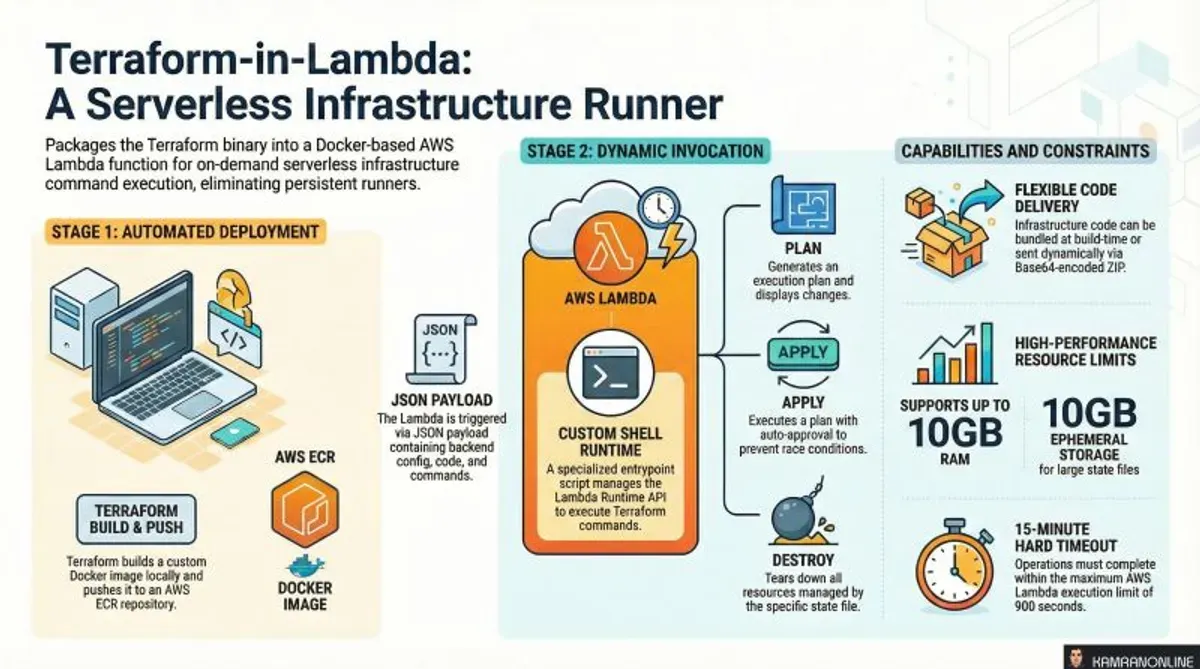
What if you could execute Terraform operations—plan, apply, destroy—without maintaining any infrastructure? No EC2 instances, no self-hosted runners, no dedicated CI/CD servers. Just pure, serverless, on-demand infrastructure automation.
I built terraform-in-lambda to do exactly that: a production-ready Terraform module that packages Terraform into an AWS Lambda function, turning it into a serverless infrastructure runner.
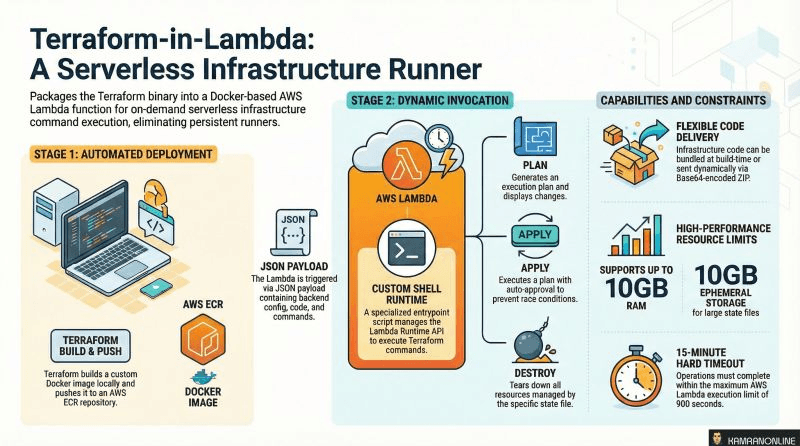
The Problem: Infrastructure Automation Overhead
Let’s talk about the typical Terraform execution patterns and their challenges:
Pattern 1: Developer Laptop
# Manual execution
cd infrastructure/
terraform plan
terraform apply
Problems:
- ❌ No automation—requires manual intervention
- ❌ Inconsistent execution environments
- ❌ No audit trail or centralized logging
- ❌ Credential management scattered across developer machines
- ❌ Can’t respond to events (alarms, schedule, API calls)
Pattern 2: CI/CD Pipeline (GitHub Actions, GitLab CI, Jenkins)
# GitHub Actions workflow
jobs:
  terraform:
    runs-on: ubuntu-latest
    steps:
      - name: Terraform Apply
        run: terraform apply -auto-approve
Problems:
- ❌ CI/CD runners require persistent infrastructure (hosted or self-hosted)
- ❌ Self-hosted runners need maintenance, updates, and monitoring
- ❌ GitHub Actions minutes cost money at scale
- ❌ Difficult to trigger from AWS events (CloudWatch alarms, EventBridge)
- ❌ GitOps-only (can’t easily trigger programmatically)
Pattern 3: Dedicated EC2 Instance / Bastion
# SSH into bastion
ssh bastion.company.com
cd /infrastructure
terraform apply
Problems:
- ❌ EC2 instance running 24/7 for occasional Terraform runs
- ❌ Requires patching, hardening, and monitoring
- ❌ Single point of failure
- ❌ Cost inefficient—paying for idle time
The Solution: Terraform as a Lambda Function
What if Terraform execution could be:
- ✅ Serverless — No infrastructure to maintain
- ✅ Event-driven — Triggered by EventBridge, API Gateway, SNS, or manual invocations
- ✅ Cost-effective — Pay only for execution time (millisecond billing)
- ✅ Scalable — Lambda auto-scales across concurrent executions
- ✅ Secure — IAM-based permissions with temporary credentials
- ✅ Auditable — Full CloudWatch logging and CloudTrail events
That’s exactly what this module provides.
How It Works: Architecture Deep-Dive
The module implements a Docker-based Lambda function with a custom shell runtime that executes Terraform commands on demand.
Build Phase: Creating the Lambda Container
Step 1: Docker Image Construction
The module builds a custom Docker image based on hashicorp/terraform:
FROM hashicorp/terraform:1.11-alpine

# Install dependencies
RUN apk add --no-cache \
    aws-cli \
    jq \
    zip \
    unzip \
    curl \
    bash \
    dos2unix

# Copy custom runtime
COPY entrypoint.sh /entrypoint.sh
RUN chmod +x /entrypoint.sh

ENTRYPOINT ["/entrypoint.sh"]
Why these dependencies?
aws-cli— Credential configuration and AWS operationsjq— JSON parsing for Lambda Runtime APIzip/unzip— Extract dynamically sent Terraform codecurl— Communicate with Lambda Runtime APIbash— Execute Terraform commandsdos2unix— Handle cross-platform line endings
Step 2: ECR Image Storage
The kreuzwerker/docker Terraform provider automatically:
- Builds the Docker image locally
- Authenticates to your ECR registry
- Pushes the image to ECR
- Tags with proper versioning
resource "docker_image" "terraform_lambda" {
  name = "${aws_ecr_repository.this.repository_url}:${var.image_tag}"

  build {
    context    = "${path.module}/docker"
    dockerfile = "Dockerfile"
    build_args = {
      TERRAFORM_VERSION = var.terraform_version
    }
  }
}
Step 3: Lambda Function Creation
resource "aws_lambda_function" "terraform_runner" {
  function_name = var.function_name
  role          = aws_iam_role.lambda_exec.arn
  package_type  = "Image"
  image_uri     = docker_image.terraform_lambda.name

  timeout     = var.function_timeout      # Up to 15 minutes
  memory_size = var.function_memory_size  # Up to 10GB

  ephemeral_storage {
    size = var.ephemeral_storage_size     # Up to 10GB for /tmp
  }
}
Execution Phase: Custom Runtime Implementation
The magic happens in entrypoint.sh, which implements the Lambda Runtime API:
The Runtime Loop:
#!/bin/bash
set -euo pipefail

# Lambda Runtime API endpoints
RUNTIME_API="http://${AWS_LAMBDA_RUNTIME_API}/2018-06-01/runtime"

while true; do
  # 1. Poll for next invocation
  HEADERS=$(mktemp)
  EVENT_DATA=$(curl -sS -LD "$HEADERS" -X GET "${RUNTIME_API}/invocation/next")

  # 2. Extract request ID from headers
  REQUEST_ID=$(grep -Fi Lambda-Runtime-Aws-Request-Id "$HEADERS" | tr -d '[:space:]' | cut -d: -f2)

  # 3. Parse event payload
  COMMAND=$(echo "$EVENT_DATA" | jq -r '.command // "plan"')
  TF_CODE=$(echo "$EVENT_DATA" | jq -r '.tf_code // ""')
  BACKEND=$(echo "$EVENT_DATA" | jq -r '.backend // ""')

  # 4. Configure AWS credentials (if provided)
  if [[ -n "$(echo "$EVENT_DATA" | jq -r '.aws_access_key // ""')" ]]; then
    export AWS_ACCESS_KEY_ID=$(echo "$EVENT_DATA" | jq -r '.aws_access_key')
    export AWS_SECRET_ACCESS_KEY=$(echo "$EVENT_DATA" | jq -r '.aws_secret_key')
    export AWS_SESSION_TOKEN=$(echo "$EVENT_DATA" | jq -r '.aws_session_token // ""')
  fi

  # 5. Extract Terraform code (if dynamic)
  if [[ -n "$TF_CODE" ]]; then
    echo "$TF_CODE" | base64 -d > /tmp/code.zip
    unzip -o /tmp/code.zip -d /tmp/terraform
  elif [[ -d /bundled-code ]]; then
    cp -r /bundled-code /tmp/terraform
  fi

  # 6. Write backend configuration
  if [[ -n "$BACKEND" ]]; then
    echo "$BACKEND" | base64 -d > /tmp/terraform/backend.tf
  fi

  # 7. Execute Terraform
  cd /tmp/terraform
  terraform init -input=false
  terraform $COMMAND -input=false -auto-approve

  # 8. Report success
  curl -X POST "${RUNTIME_API}/invocation/${REQUEST_ID}/response" -d '{"status":"success"}'
done
Key Design Decisions:
- Infinite Loop: Lambda keeps the container alive for subsequent invocations (warm starts)
- Runtime API Contract: Implements the standard AWS Lambda interface without language-specific SDKs
- Dynamic Code Loading: Supports both bundled code (fast) and runtime code (flexible)
- Credential Flexibility: Uses Lambda role by default, allows override for multi-account scenarios
- Ephemeral Filesystem: Uses
/tmp(up to 10GB) for Terraform working directory
Capabilities and Constraints
What You Can Do
✅ Terraform Commands:
plan— Preview infrastructure changesapply— Create/update infrastructuredestroy— Tear down resourcesvalidate— Check configuration syntaxinit— Initialize backend (usually automatic)
✅ Flexible Code Delivery:
Option 1: Bundle at Build Time (Faster)
module "terraform_lambda" {
  source = "KamranBiglari/terraform-in-lambda/aws"

  terraform_code_source_path = "${path.module}/infrastructure"
  terraform_code_source_exclude = [
    ".terraform/**",
    "*.tfstate*"
  ]
}
Option 2: Send Code Dynamically (More Flexible)
{
  "command": "apply",
  "tf_code": "<base64-encoded-zip-of-terraform-files>",
  "backend": "<base64-encoded-backend-config>"
}
✅ Custom Environment Variables:
{
  "command": "apply",
  "envs": "VEZfVkFSX3JlZ2lvbj11cy1lYXN0LTEKVEZfVkFSX2Vudmlyb25tZW50PXByb2Q="
}
Decodes to:
TF_VAR_region=us-east-1
TF_VAR_environment=prod
✅ Multi-Account Execution:
{
  "command": "apply",
  "aws_access_key": "AKIA...",
  "aws_secret_key": "...",
  "aws_session_token": "..."
}
✅ Private Terraform Registry:
{
  "command": "plan",
  "tfconfig": "ewogICJjcmVkZW50aWFscyI6IHsKICAgICJhcHAudGVycmFmb3JtLmlvIjogewogICAgICAidG9rZW4iOiAiLi4uIgogICAgfQogIH0KfQo="
}
Constraints
⏱️ 15-Minute Timeout:
- Lambda maximum execution time is 900 seconds
- Large infrastructure operations may exceed this limit
- Solution: Break into smaller operations or use Step Functions for orchestration
💾 10GB Ephemeral Storage:
/tmpfilesystem limited to 10GB- Large Terraform states or provider downloads may hit limits
- Solution: Use remote state (S3), minimize provider cache
🔐 Secrets in CloudWatch Logs:
- Terraform output (including sensitive values) goes to CloudWatch
- Solution: Mark outputs as
sensitive = truein Terraform, use encryption at rest for logs
🐳 Build-Time Dependency:
- Requires Docker Engine on deployment machine
- Solution: Run Terraform deployments from CI/CD or local development machines with Docker
Implementation Guide
Prerequisites
1. Local Requirements:
- Docker Engine running (for image builds)
- Terraform >= 1.0.11
- AWS credentials configured
2. AWS Requirements:
- ECR repository (created automatically)
- IAM permissions for Lambda, ECR, CloudWatch
- Optional: VPC for network-isolated execution
Step 1: Deploy the Module
Create a main.tf:
terraform {
  required_providers {
    aws = {
      source  = "hashicorp/aws"
      version = "~> 5.8"
    }
    docker = {
      source  = "kreuzwerker/docker"
      version = "~> 3.0"
    }
  }
}

provider "aws" {
  region = "us-east-1"
}

# Docker provider for building images
provider "docker" {
  registry_auth {
    address  = data.aws_ecr_authorization_token.token.proxy_endpoint
    username = data.aws_ecr_authorization_token.token.user_name
    password = data.aws_ecr_authorization_token.token.password
  }
}

data "aws_ecr_authorization_token" "token" {}

module "terraform_lambda" {
  source  = "KamranBiglari/terraform-in-lambda/aws"
  version = "1.0.0"

  # Basic Configuration
  function_name      = "terraform-runner"
  terraform_version  = "1.11"

  # Resource Allocation
  function_timeout          = 900    # 15 minutes
  function_memory_size      = 4096   # 4GB
  ephemeral_storage_size    = 4096   # 4GB

  # Optional: Bundle Terraform code at build time
  terraform_code_source_path = "${path.module}/infrastructure"
  terraform_code_source_exclude = [
    ".terraform/**",
    "*.tfstate*",
    ".git/**"
  ]

  # Optional: VPC deployment
  function_create_sg      = false
  function_vpc_subnet_ids = []

  # CloudWatch Logs
  function_cloudwatch_logs_retention_in_days = 30

  tags = {
    Environment = "production"
    ManagedBy   = "terraform"
  }
}

output "lambda_function_name" {
  value = module.terraform_lambda.lambda_function_name
}

output "lambda_function_arn" {
  value = module.terraform_lambda.lambda_function_arn
}
Deploy:
terraform init
terraform apply
What gets created:
- ECR repository for Docker images
- Docker image built and pushed to ECR
- Lambda function with IAM execution role
- CloudWatch log group
- Optional: VPC security group
Step 2: Create IAM Policies for Terraform Execution
The Lambda needs permissions to manage infrastructure. Create a custom policy:
resource "aws_iam_role_policy" "terraform_permissions" {
  name = "terraform-execution-permissions"
  role = module.terraform_lambda.lambda_execution_role_id

  policy = jsonencode({
    Version = "2012-10-17"
    Statement = [
      {
        Effect = "Allow"
        Action = [
          "ec2:*",
          "s3:*",
          "dynamodb:*",
          "iam:*",
          # Add all AWS services your Terraform code manages
        ]
        Resource = "*"
      }
    ]
  })
}
Security Best Practice: Grant least-privilege permissions based on what your Terraform code actually manages.
Step 3: Invoke the Lambda Function
Option A: AWS CLI (Testing)
# Execute a Terraform plan with bundled code
aws lambda invoke \
  --function-name terraform-runner \
  --payload '{"command": "plan"}' \
  response.json

cat response.json
Option B: With Dynamic Code
# Prepare Terraform code
cd infrastructure/
zip -r /tmp/code.zip *.tf

# Base64 encode
TF_CODE=$(base64 -w 0 /tmp/code.zip)

# Backend configuration
BACKEND_CONFIG='
terraform {
  backend "s3" {
    bucket = "my-terraform-state"
    key    = "prod/infrastructure.tfstate"
    region = "us-east-1"
  }
}
'
BACKEND=$(echo "$BACKEND_CONFIG" | base64 -w 0)

# Invoke
aws lambda invoke \
  --function-name terraform-runner \
  --payload "{
    \"command\": \"apply\",
    \"tf_code\": \"$TF_CODE\",
    \"backend\": \"$BACKEND\"
  }" \
  response.json
Option C: From Python Application
import boto3
import base64
import json

lambda_client = boto3.client('lambda')

# Prepare Terraform code
with open('/tmp/code.zip', 'rb') as f:
    tf_code_b64 = base64.b64encode(f.read()).decode()

# Prepare backend config
backend_config = """
terraform {
  backend "s3" {
    bucket = "my-terraform-state"
    key    = "prod/infrastructure.tfstate"
    region = "us-east-1"
  }
}
"""
backend_b64 = base64.b64encode(backend_config.encode()).decode()

# Invoke
response = lambda_client.invoke(
    FunctionName='terraform-runner',
    InvocationType='RequestResponse',
    Payload=json.dumps({
        'command': 'apply',
        'tf_code': tf_code_b64,
        'backend': backend_b64
    })
)

result = json.loads(response['Payload'].read())
print(result)
Real-World Use Cases
1. Scheduled Drift Detection and Remediation
Automatically detect and fix configuration drift every night:
# EventBridge rule
resource "aws_cloudwatch_event_rule" "nightly_drift_check" {
  name                = "nightly-terraform-reconciliation"
  schedule_expression = "cron(0 2 * * ? *)"  # 2 AM daily
}

resource "aws_cloudwatch_event_target" "lambda" {
  rule      = aws_cloudwatch_event_rule.nightly_drift_check.name
  target_id = "terraform-runner"
  arn       = module.terraform_lambda.lambda_function_arn

  input = jsonencode({
    command = "apply"
    # Code bundled in Lambda container
  })
}

resource "aws_lambda_permission" "allow_eventbridge" {
  statement_id  = "AllowExecutionFromEventBridge"
  action        = "lambda:InvokeFunction"
  function_name = module.terraform_lambda.lambda_function_name
  principal     = "events.amazonaws.com"
  source_arn    = aws_cloudwatch_event_rule.nightly_drift_check.arn
}
Result: Infrastructure stays compliant 24/7 without manual intervention.
2. Self-Service Developer Platform
Build an internal platform where developers request infrastructure via API:
# Flask API endpoint
@app.route('/infrastructure/create', methods=['POST'])
def create_infrastructure():
    data = request.json

    # Generate Terraform code from template
    tf_code = render_template('vpc.tf.j2',
        region=data['region'],
        cidr=data['cidr_block'],
        environment=data['environment']
    )

    # Zip and encode
    zip_buffer = create_zip({'main.tf': tf_code})
    tf_code_b64 = base64.b64encode(zip_buffer.getvalue()).decode()

    # Invoke Lambda
    lambda_client.invoke(
        FunctionName='terraform-runner',
        InvocationType='Event',  # Async
        Payload=json.dumps({
            'command': 'apply',
            'tf_code': tf_code_b64,
            'backend': generate_backend_config(data['project_id'])
        })
    )

    return {'status': 'provisioning', 'job_id': '...'}
Result: Developers get infrastructure on-demand without Terraform knowledge.
3. Event-Driven Infrastructure Scaling
Respond to CloudWatch alarms by provisioning additional resources:
# CloudWatch Alarm → SNS → Lambda
resource "aws_cloudwatch_metric_alarm" "high_cpu" {
  alarm_name          = "rds-high-cpu"
  comparison_operator = "GreaterThanThreshold"
  evaluation_periods  = 2
  metric_name         = "CPUUtilization"
  namespace           = "AWS/RDS"
  period              = 300
  statistic           = "Average"
  threshold           = 80
  alarm_actions       = [aws_sns_topic.scaling.arn]
}

resource "aws_sns_topic_subscription" "lambda" {
  topic_arn = aws_sns_topic.scaling.arn
  protocol  = "lambda"
  endpoint  = module.terraform_lambda.lambda_function_arn
}
Lambda payload handler:
# In entrypoint.sh - parse SNS message
ALARM_NAME=$(echo "$EVENT_DATA" | jq -r '.Records[0].Sns.Message' | jq -r '.AlarmName')

if [[ "$ALARM_NAME" == "rds-high-cpu" ]]; then
  # Apply Terraform to add read replica
  cd /tmp/terraform
  terraform apply -var="add_replica=true" -auto-approve
fi
Result: Infrastructure auto-scales based on metrics.
4. Multi-Account Infrastructure Management
Centralized infrastructure management across AWS accounts:
# Admin Lambda invokes Terraform for each account
accounts = [
    {'id': '111111111111', 'role': 'arn:aws:iam::111111111111:role/TerraformRole'},
    {'id': '222222222222', 'role': 'arn:aws:iam::222222222222:role/TerraformRole'},
]

for account in accounts:
    # Assume role
    sts = boto3.client('sts')
    creds = sts.assume_role(
        RoleArn=account['role'],
        RoleSessionName='terraform-runner'
    )

    # Invoke Lambda with temporary credentials
    lambda_client.invoke(
        FunctionName='terraform-runner',
        Payload=json.dumps({
            'command': 'apply',
            'aws_access_key': creds['Credentials']['AccessKeyId'],
            'aws_secret_key': creds['Credentials']['SecretAccessKey'],
            'aws_session_token': creds['Credentials']['SessionToken'],
            'tf_code': get_account_terraform_code(account['id'])
        })
    )
Result: Single Lambda manages infrastructure across organizational units.
5. Ephemeral Testing Environments
Spin up and tear down test environments on-demand:
# CI/CD pipeline
- name: Create Test Environment
  run: |
    aws lambda invoke \
      --function-name terraform-runner \
      --payload '{"command": "apply", "envs": "'$(echo "TF_VAR_branch=$BRANCH_NAME" | base64)'"}'

- name: Run Integration Tests
  run: pytest tests/integration/

- name: Destroy Test Environment
  run: |
    aws lambda invoke \
      --function-name terraform-runner \
      --payload '{"command": "destroy"}'
Result: Zero-cost test environments that exist only during test execution.
Advanced Configuration
VPC Deployment for Private Resources
If your Terraform manages resources in private subnets:
module "terraform_lambda" {
  source = "KamranBiglari/terraform-in-lambda/aws"

  # ... other config ...

  # VPC Configuration
  function_create_sg = true
  function_vpc_subnet_ids = [
    "subnet-abc123",
    "subnet-def456"
  ]

  # Lambda will automatically create security group
  # with egress to 0.0.0.0/0 (for Terraform provider downloads)
}
Use cases:
- Managing RDS databases in private subnets
- Provisioning resources in isolated VPCs
- Compliance requirements for network isolation
Custom Terraform CLI Configuration
For private Terraform registries or custom provider mirrors:
{
  "command": "plan",
  "tfconfig": "ewogICJjcmVkZW50aWFscyI6IHsKICAgICJhcHAudGVycmFmb3JtLmlvIjogewogICAgICAidG9rZW4iOiAiWU9VUl9UT0tFTiIKICAgIH0KICB9Cn0K"
}
Decodes to .terraformrc:
credentials "app.terraform.io" {
  token = "YOUR_TOKEN"
}
Debug Mode
Enable verbose output for troubleshooting:
{
  "command": "apply",
  "debug": true
}
This outputs:
- Full Terraform execution logs
- AWS SDK debug information
- Environment variables (sanitized)
- File system state
Security Best Practices
1. Least-Privilege IAM Policies
Anti-pattern:
# DON'T DO THIS
resource "aws_iam_role_policy" "bad" {
  policy = jsonencode({
    Statement = [{
      Effect   = "Allow"
      Action   = "*"
      Resource = "*"
    }]
  })
}
Best practice:
resource "aws_iam_role_policy" "good" {
  policy = jsonencode({
    Statement = [
      {
        Effect = "Allow"
        Action = [
          "ec2:Describe*",
          "ec2:CreateTags",
          "ec2:DeleteTags"
        ]
        Resource = "*"
      },
      {
        Effect = "Allow"
        Action = [
          "ec2:RunInstances",
          "ec2:TerminateInstances"
        ]
        Resource = "arn:aws:ec2:*:*:instance/*"
        Condition = {
          StringEquals = {
            "aws:RequestedRegion": ["us-east-1", "eu-west-1"]
          }
        }
      }
    ]
  })
}
2. Encrypt CloudWatch Logs
resource "aws_cloudwatch_log_group" "terraform_lambda" {
  name              = "/aws/lambda/terraform-runner"
  retention_in_days = 30
  kms_key_id        = aws_kms_key.logs.arn
}

resource "aws_kms_key" "logs" {
  description = "Encrypt Terraform Lambda logs"

  policy = jsonencode({
    Statement = [
      {
        Sid    = "Enable CloudWatch Logs"
        Effect = "Allow"
        Principal = {
          Service = "logs.amazonaws.com"
        }
        Action = [
          "kms:Encrypt",
          "kms:Decrypt",
          "kms:ReEncrypt*",
          "kms:GenerateDataKey*",
          "kms:CreateGrant",
          "kms:DescribeKey"
        ]
        Resource = "*"
      }
    ]
  })
}
3. Secure Terraform State
Never store state in Lambda:
# Always use remote backend
terraform {
  backend "s3" {
    bucket         = "my-terraform-state"
    key            = "prod/infrastructure.tfstate"
    region         = "us-east-1"
    encrypt        = true
    dynamodb_table = "terraform-locks"
    kms_key_id     = "arn:aws:kms:us-east-1:123456789012:key/..."
  }
}
4. Validate Payloads
Implement input validation in Lambda:
# In entrypoint.sh
ALLOWED_COMMANDS=("plan" "apply" "destroy" "validate")

if [[ ! " ${ALLOWED_COMMANDS[@]} " =~ " ${COMMAND} " ]]; then
  echo "Invalid command: $COMMAND"
  curl -X POST "${RUNTIME_API}/invocation/${REQUEST_ID}/error" \
    -d '{"errorMessage":"Invalid Terraform command"}'
  continue
fi
5. Enable ECR Image Scanning
resource "aws_ecr_repository" "terraform_lambda" {
  name                 = "terraform-runner"
  image_tag_mutability = "MUTABLE"

  image_scanning_configuration {
    scan_on_push = true
  }
}
Review scan results:
aws ecr describe-image-scan-findings \
  --repository-name terraform-runner \
  --image-id imageTag=latest
Monitoring and Observability
CloudWatch Metrics
Key metrics to monitor:
resource "aws_cloudwatch_metric_alarm" "lambda_errors" {
  alarm_name          = "terraform-lambda-errors"
  comparison_operator = "GreaterThanThreshold"
  evaluation_periods  = 1
  metric_name         = "Errors"
  namespace           = "AWS/Lambda"
  period              = 300
  statistic           = "Sum"
  threshold           = 0
  alarm_actions       = [aws_sns_topic.alerts.arn]

  dimensions = {
    FunctionName = module.terraform_lambda.lambda_function_name
  }
}

resource "aws_cloudwatch_metric_alarm" "lambda_duration" {
  alarm_name          = "terraform-lambda-timeout-risk"
  comparison_operator = "GreaterThanThreshold"
  evaluation_periods  = 1
  metric_name         = "Duration"
  namespace           = "AWS/Lambda"
  period              = 300
  statistic           = "Maximum"
  threshold           = 800000  # 800 seconds (warn before 900s timeout)
  alarm_actions       = [aws_sns_topic.alerts.arn]

  dimensions = {
    FunctionName = module.terraform_lambda.lambda_function_name
  }
}
CloudWatch Insights Queries
Find all Terraform apply operations:
fields @timestamp, @message
| filter @message like /terraform apply/
| sort @timestamp desc
| limit 100
Identify failures:
fields @timestamp, @message
| filter @message like /Error:/
| stats count() by bin(5m)
Track resource changes:
fields @timestamp, @message
| parse @message /Plan: (?<add>\d+) to add, (?<change>\d+) to change, (?<destroy>\d+) to destroy/
| filter ispresent(add)
X-Ray Tracing (Advanced)
Enable distributed tracing:
resource "aws_lambda_function" "terraform_runner" {
  # ... other config ...

  tracing_config {
    mode = "Active"
  }
}
Add to IAM role:
resource "aws_iam_role_policy_attachment" "xray" {
  role       = module.terraform_lambda.lambda_execution_role_id
  policy_arn = "arn:aws:iam::aws:policy/AWSXRayDaemonWriteAccess"
}
Cost Optimization
Pricing Breakdown
Lambda pricing (us-east-1):
- Requests: $0.20 per 1M requests
- Duration: $0.0000166667 per GB-second
- Ephemeral storage: $0.0000000309 per GB-second (over 512MB)
Example: Daily drift detection
Assumptions:
- 4GB memory
- 2-minute execution
- 1 execution per day
Monthly cost:
Requests: 30 × $0.20 / 1,000,000 = $0.000006
Duration: 30 × (4 GB × 120s) × $0.0000166667 = $0.24
Total: ~$0.24/month
Compare to:
- EC2 t3.medium (24/7): ~$30/month
- GitHub Actions (2000 minutes/month): $0 (free tier), then $0.008/minute
Optimization Strategies
1. Right-Size Memory Allocation
# Test with different memory sizes
for memory in 1024 2048 4096 8192; do
  aws lambda update-function-configuration \
    --function-name terraform-runner \
    --memory-size $memory

  # Run test and measure duration
  time aws lambda invoke --function-name terraform-runner ...
done
2. Use Bundled Code When Possible
Bundled code avoids base64 encoding/decoding overhead:
# Faster execution
terraform_code_source_path = "${path.module}/infrastructure"
vs.
// Slower execution (dynamic code)
{
  "tf_code": "<base64-zip>"
}
3. Optimize Container Image Size
# Multi-stage build to reduce image size
FROM hashicorp/terraform:1.11-alpine AS terraform

FROM alpine:3.19
COPY --from=terraform /bin/terraform /bin/terraform
# ... install only necessary tools
4. Leverage Lambda SnapStart (Future)
Currently not supported for container images, but monitor for updates.
Troubleshooting Guide
Problem: “Task timed out after 900.00 seconds”
Cause: Terraform operation exceeds 15-minute Lambda limit.
Solutions:
-
Break into smaller operations:
# Instead of applying entire infrastructure # Split into modules and apply separately -
Use Step Functions for orchestration:
resource "aws_sfn_state_machine" "terraform_pipeline" { definition = jsonencode({ StartAt = "Init" States = { Init = { Type = "Task" Resource = module.terraform_lambda.lambda_function_arn Next = "Plan" } Plan = { Type = "Task" Resource = module.terraform_lambda.lambda_function_arn Next = "Apply" } Apply = { Type = "Task" Resource = module.terraform_lambda.lambda_function_arn End = true } } }) } -
Optimize Terraform performance:
# Use -parallelism flag
terraform apply -parallelism=20

# Reduce provider re-initialization
# Use persistent backend config
Problem: “Failed to download provider”
Cause: Lambda can’t reach Terraform Registry or GitHub.
Solutions:
-
VPC NAT Gateway:
# Ensure Lambda has internet access via NAT function_vpc_subnet_ids = [aws_subnet.private_with_nat.id] -
VPC Endpoints:
resource "aws_vpc_endpoint" "s3" { vpc_id = var.vpc_id service_name = "com.amazonaws.${var.region}.s3" } -
Provider caching:
# In Terraform code
terraform {
  required_providers {
    aws = {
      source  = "hashicorp/aws"
      version = "~> 5.0"
    }
  }
}

# Cache in container image at build time
Problem: “No space left on device”
Cause: Terraform state or provider cache exceeds ephemeral storage.
Solutions:
-
Increase ephemeral storage:
ephemeral_storage_size = 10240 # 10GB max -
Use remote state:
terraform { backend "s3" { # Don't store large state locally } } -
Clean up /tmp:
# In entrypoint.sh, before terraform execution
rm -rf /tmp/terraform/.terraform/providers/*
Problem: “Error: Unsupported credential source”
Cause: Credential provider chain misconfiguration.
Solutions:
-
Check environment variables:
# In CloudWatch logs echo "AWS_ACCESS_KEY_ID: $AWS_ACCESS_KEY_ID" echo "AWS_SECRET_ACCESS_KEY: ${AWS_SECRET_ACCESS_KEY:0:4}***" -
Verify IAM role trust:
aws sts get-caller-identity -
Use explicit credentials:
{
  "command": "plan",
  "aws_access_key": "...",
  "aws_secret_key": "..."
}
Comparison: Lambda vs. Traditional Runners
| Feature | Lambda (This Module) | EC2 Runner | GitHub Actions |
|---|---|---|---|
| Infrastructure | Serverless | Self-managed | Hosted/Self-hosted |
| Cost (light usage) | ~$0.24/month | ~$30/month | Free tier, then $0.008/min |
| Scaling | Automatic | Manual | Limited concurrency |
| Maintenance | Zero | Patching, updates | Self-hosted: patching |
| Event-driven | Native | Complex | Webhook-based |
| Max execution time | 15 minutes | Unlimited | 6 hours (self-hosted: unlimited) |
| Cold start | 1-3 seconds | None | Variable |
| Multi-account | Native (AssumeRole) | Complex | Requires secrets |
| Audit logging | CloudTrail + CW | Manual | GitHub audit log |
Limitations and Considerations
When NOT to Use This
❌ Very Large Infrastructure Operations
- Terraform applies taking > 15 minutes
- Alternative: Use EC2 spot instances or AWS Batch
❌ Interactive Workflows
- Operations requiring human approval mid-execution
- Alternative: Use Terraform Cloud or Atlantis
❌ Persistent Terraform Workspaces
- Need to maintain multiple workspaces with local state
- Alternative: Terraform Cloud workspaces
❌ Complex Provider Authentication
- Providers requiring complex OAuth flows or device codes
- Alternative: Pre-authenticate and inject tokens
When This Excels
✅ Scheduled reconciliation — Nightly drift detection ✅ Event-driven provisioning — React to CloudWatch alarms, SNS topics ✅ API-driven infrastructure — Self-service platforms ✅ Multi-account management — Centralized control across AWS Organizations ✅ Ephemeral environments — Short-lived test infrastructure ✅ Cost-sensitive workloads — Avoid 24/7 runner costs
Conclusion
Running Terraform in AWS Lambda represents a paradigm shift in infrastructure automation—from infrastructure-based (EC2, CI/CD runners) to serverless, event-driven execution.
Key Benefits Recap
✅ Zero Infrastructure: No servers, no maintenance, no patching ✅ Cost-Effective: Pay only for execution time (~$0.24/month for daily runs) ✅ Event-Driven: Native integration with EventBridge, SNS, API Gateway ✅ Scalable: Concurrent executions for multi-account management ✅ Secure: IAM-based permissions with CloudTrail audit logging ✅ Flexible: Bundle code or send dynamically, support for custom credentials
Getting Started
- Explore the module: github.com/KamranBiglari/terraform-aws-terraform-in-lambda
- Check Terraform Registry: registry.terraform.io/modules/KamranBiglari/terraform-in-lambda/aws
- Start with bundled code: Deploy with your infrastructure pre-packaged
- Add event triggers: Set up EventBridge rules for scheduled execution
- Scale to production: Implement monitoring, alerting, and multi-account patterns
What’s Next?
The module is open source and actively maintained. Potential future enhancements:
- Terraform Cloud/Enterprise integration
- Step Functions-based long-running operation support
- Built-in approval workflows
- Enhanced observability with structured logging
This module bridges the gap between traditional Terraform execution and serverless, event-driven infrastructure management. Whether you’re building a self-service platform, automating drift detection, or managing multi-account infrastructure, Terraform-in-Lambda provides the foundation for serverless Infrastructure as Code.
Resources:
- GitHub Repository: terraform-aws-terraform-in-lambda
- Terraform Registry: Official Module
- AWS Lambda Runtime API: Documentation
- Terraform Documentation: AWS Provider
Have you tried running Terraform serverlessly? What use cases are you considering? Share your thoughts or reach out on LinkedIn!