Why I stopped using ElastiCache for dev and test environments
ElastiCache is a good product. For a production cache that has to survive everything, it's still what I'd reach for.
But most of the Redis clusters I've paid for over the years weren't that. They were dev environments. Test environments. A preview stack for a feature branch that lived for four days. Clusters that were needed between nine and six on weekdays and sat there billing by the hour the rest of the time, because there was no straightforward way to make them go away and come back.
That's the itch this module scratches:
https://registry.terraform.io/modules/KamranBiglari/containerize-redis/aws/latest
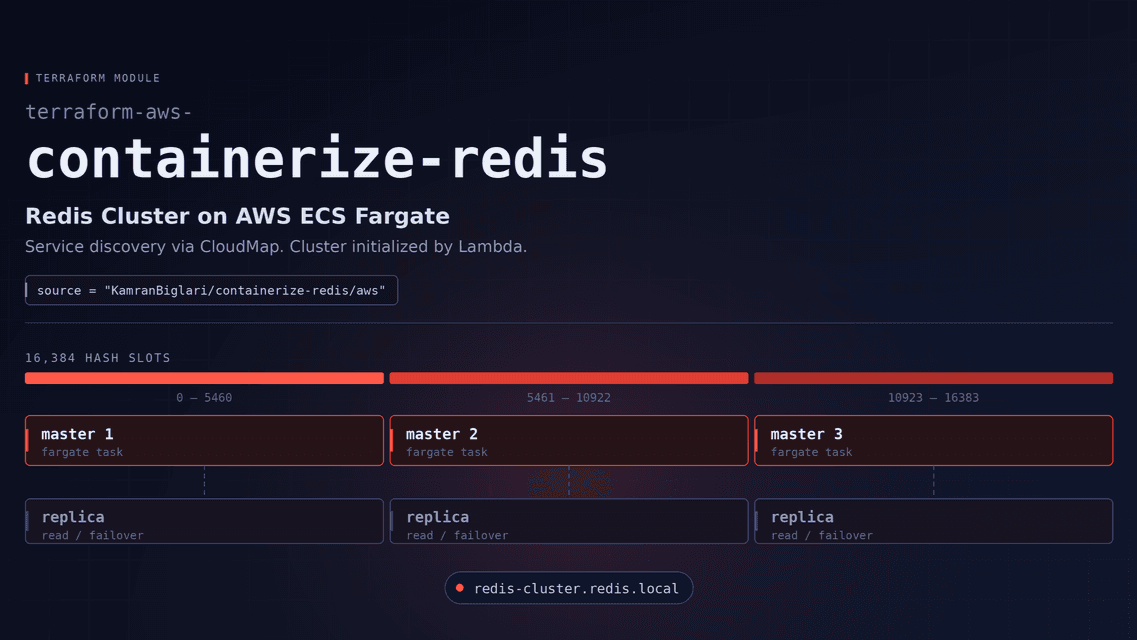
It runs Redis Cluster on ECS Fargate. Same topology as production, in your VPC, with an endpoint your applications can find and you can throw the whole thing away in two minutes and rebuild it just as fast.
Why not just use ElastiCache?
Fair question. Here's my honest list.
You can turn it off. An ElastiCache node bills for as long as it exists. This is six Fargate tasks: terraform destroy and the bill stops, terraform apply and you're back in a few minutes with a fully formed cluster. For an environment that's genuinely needed eight hours a day, five days a week, that difference is most of your bill.
It's cheaper while it's running, too. Six nodes at 0.25 vCPU and 1 GB each costs roughly $0.09 an hour for the whole cluster in us-east-1, about $64 a month if you leave it up permanently, or around $15 if you only run it during working hours. Compare that against whatever your ElastiCache line item says. No reserved nodes, no commitments, no minimum.
It's still fully managed compute. This isn't Redis on EC2. There are no instances to patch, no AMIs, no capacity to plan, no SSH. Fargate schedules the tasks and replaces them when they fail, the same as every other service you run.
ElastiCache's Redis engine has stopped moving. After the Redis licence change, AWS put its engine work into Valkey. ElastiCache for Redis OSS tops out at 7.1, and that's where it's staying. Here, the image is a variable:
redis_image = "redis:8.0-alpine"That's your upgrade. You pick the version, you pick the base image, and the same door opens for images that ship Redis modules if you need them. Nobody's roadmap is in the way.
Authentication is supported, and the endpoint arrives in Cloud Map automatically, so your applications get one stable DNS name to connect to rather than a list of node addresses. More on both below.
What you actually get
module "redis" {
  source  = "KamranBiglari/containerize-redis/aws"
  version = "~> 1.0"

  cluster_name = "my-redis"
  vpc_id       = "vpc-xxxxx"
  subnet_ids   = ["subnet-a", "subnet-b", "subnet-c"]

  redis_master_count  = 3
  redis_replica_count = 3

  allowed_cidr_blocks = ["10.0.0.0/16"]
}
terraform apply, and a few minutes later:
Six tasks, one Redis node each, three masters and three replicas, all healthy.
And it's a real cluster, not three unrelated servers behind one name:
All 16384 hash slots assigned, six nodes that know about each other, three shards sharing the keyspace. MOVED redirects, slot ownership, failover: your client sees what it would see against any Redis Cluster anywhere. If your staging environment is a single Redis node while production is a cluster, staging isn't testing the part that breaks. This closes that gap for the price of a coffee.
Connecting to it
The nodes register themselves in AWS Cloud Map as they start, so you get one name that stays put while tasks and IPs come and go:
redis-cluster.redis.localPoint a cluster-aware client at it and let it discover the topology:
from redis.cluster import RedisCluster

r = RedisCluster(host="redis-cluster.redis.local", port=6379, decode_responses=True)
r.set("hello", "world")
const Redis = require("ioredis");
const redis = new Redis.Cluster([
{ host: "redis-cluster.redis.local", port: 6379 },
]);Anything in the VPC whose CIDR range is in allowed_cidr_blocks can reach it. Nothing is exposed to the internet.
Authentication
Off by default. To turn it on, let the module own the secret:
create_redis_password_secret = trueYou get a generated password in Secrets Manager, and it's stored as a connection document rather than a bare string:
{
  "host": "redis-cluster.redis.local",
  "password": "...",
  "port": 6379,
  "type": "redis-cluster"
}
One secret, everything needed to connect. Nodes come up with requirepass and masterauth set, and the password never appears in the task definition. If you'd rather manage the secret yourself, hand the module its ARN instead.
The bit that makes on-demand actually work
Tearing a Redis cluster down is easy. Bringing one back is where these setups usually fall apart, because six fresh containers aren't a cluster — someone has to introduce the nodes to each other and hand out the hash slots, and on Fargate the nodes don't exist until the service starts.
The module does that for you, on every deployment, not just the first. Tasks get replaced routinely on Fargate and each replacement is a brand-new empty node, so initialization runs whenever the service settles and quietly does nothing when the cluster is already healthy. It also keeps clients locked out until the cluster has formed, because Redis refuses to build a cluster from nodes that already hold data — one early write from an application would otherwise leave you with a cluster that can never assemble.
Which is what makes "destroy it on Friday, recreate it on Monday" a non-event rather than a runbook.
Fitting into what you already have
The example above creates its own ECS cluster, log group and Cloud Map namespace. Convenient for a standalone environment, usually wrong in a real account where you already have all three:
create_ecs_cluster        = false
existing_ecs_cluster_name = "shared-infrastructure"

create_service_discovery_namespace        = false
existing_service_discovery_namespace_name = "services.internal"

create_cloudwatch_log_group        = false
existing_cloudwatch_log_group_name = "/ecs/shared"
Same pattern for everything: a create_* toggle, a name when creating, an existing_* value when reusing.
Where I wouldn't use it
Being straight about this matters more than the pitch.
There's no persistent storage. Fargate tasks are ephemeral, and a redeploy gives you a freshly formed, empty cluster. That's deliberate. It's what makes the teardown story work, but it means this is a cache, not a database.
So: dev, test, preview and CI environments, yes. Anywhere you want production's topology without production's bill, yes. Workloads that need a Redis version or image ElastiCache won't give you, yes.
Anything where losing the contents on a deploy is an incident, no, that's what snapshots and managed failover are for. Latency-critical paths where you want tuned instances, no. And if nobody on the team wants to own a Redis image, that's a fair reason to keep paying for managed.
Good fits:
- Dev, staging and preview environments that need production's topology without a managed cluster each.
- Teams already standardized on ECS, where one more service is cheaper in attention than one more AWS service to learn.
- Workloads needing a specific Redis version, image or config flag.
- Testing how your client actually behaves against cluster semantics.
Bad fits:
- Anything where losing the cache contents on a deploy is a real incident. Use a managed service with snapshots and automatic failover.
- Latency-critical paths where you want tuned instance types and guaranteed placement.
- Teams with nobody to look after it. This is Redis on your infrastructure — patching the image and watching memory are yours now.
Try it
Registry, with a complete example and full docs: https://registry.terraform.io/modules/KamranBiglari/containerize-redis/aws/latest
Source and issues: https://github.com/KamranBiglari/terraform-aws-containerize-redis
If you try it and something breaks, open an issue. Most of what's in the module today is there because something broke first.
#aws #terraform #redis #devops #ecs #elasticache